
Participant
May 28, 2020
Answered

Linked assets just stop working

  • May 28, 2020
  • 1 reply
  • 554 views

For several times now I had issues with linked assets.


The file name in the assets list suddenly becomes cryptic, and it's assets are not updated any more.
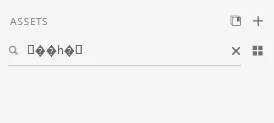
 

When filtering assets with that crpytic filename, there is no way to remove the filter. You need to restart XD.


I could remove the link to the assets and re-link them, so that's a workaround for that bug.


Is the bug known at Adobe?

    This topic has been closed for replies.
    Correct answer Jagriti_Kashyap

    Hi There,


    Sorry for the inconvenience you are facing while using XD. 

    Yes, it is a known bug and our developers are working towards it. Good to know that you have a workaround for it untill it gets fixed in the future versions.


    Regards,

    Jagriti Kashyap

    1 reply

    Jagriti_KashyapCommunity ManagerCorrect answer
    Community Manager
    May 29, 2020

    Hi There,


    Sorry for the inconvenience you are facing while using XD. 

    Yes, it is a known bug and our developers are working towards it. Good to know that you have a workaround for it untill it gets fixed in the future versions.


    Regards,

    Jagriti Kashyap

    ericamaralrohter
    Participating Frequently
    September 30, 2021

    Hi, this is still happening/happening again. Having this same problem. No one on our team can access any shared libraries from XD, even after re-sharing/re-inviting team users. There's obviously a problem. After clicking on email links that say "XXX invited you to view and use the XXX library", nothing shows up in the CC window that opens up in the browser. Even libraries that are set to be avaiaible to all team members don't show up either. Can you please let us know what the problem is and how to fix this?