
Participant
December 14, 2020
Question

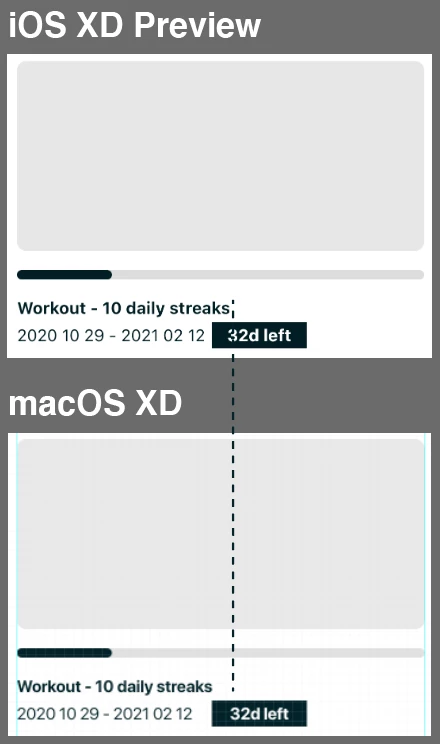
Look of font SF Pro Display does not match with mobile and desktop previews.
  • December 14, 2020
  • 1 reply
  • 457 views


Hi, just discovered that the spacing of SF Pro Display is different between platforms.

As you can see, SF Pro Display previewed in the mobile has wider spacing than the desktop.

    This topic has been closed for replies.

    1 reply

    Rishabh_Tiwari
    Community Manager
    Community Manager
    December 16, 2020

    Hi there,


    Sorry for the delay in response. We'll need to test this on our end, so please share a few more details like:


    1. The version of XD & OS.
    2. Are you previewing on the XD mobile app or on the mobile browser?
    3. Have you installed the font on the mobile device?
    4. Have you used a point text or Area text? Have you tried switching between them and see if that makes a difference?


    Regards

    Rishabh

    KibricAuthor
    Participant
    December 17, 2020

    1. I'm using XD 35.2.12.6 on macOS Big Sur 11.1, and XD 35.0 on iOS 14.2.

    2. Mobile App.

    3. I haven't, but SF Pro Display is a default font for iOS.

    4. Tried both and overflowing text is not displayed in mobile preview when it's area text.