


Participant
June 20, 2018
Question

[Mac] Prototype not displaying on Chrome due to WebGL issue (XD v9.0)

  • June 20, 2018
  • 8 replies
  • 5022 views

Posting this to help save anyone who might encounter this too.


My prototypes used to be okay on Chrome but when I updated to v9.0. I encounter this issue.
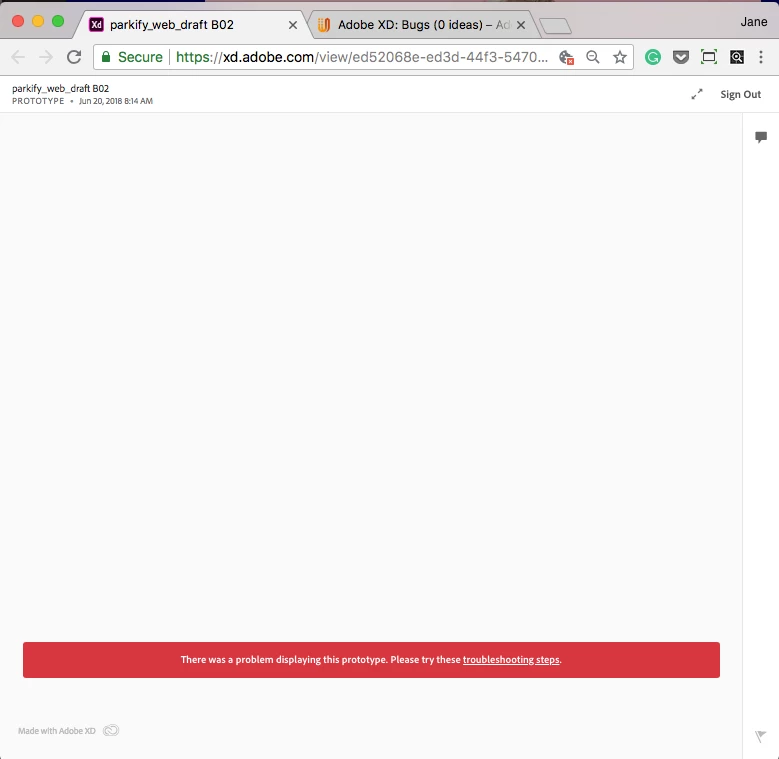
Prototypes did not display, as in it's blank white, but you can still see the recorded comments. Notif bar says "There was a problem displaying this prototype. Please try these troubleshooting steps". (see screenshot 01)

Following 'troubleshooting steps' pointed me to 'WebGL issue'. The instructions on this link resolved the issue on my Chrome.
https://forum.onshape.com/discussion/3822/mac-os-chrome-no-webgl-functionality
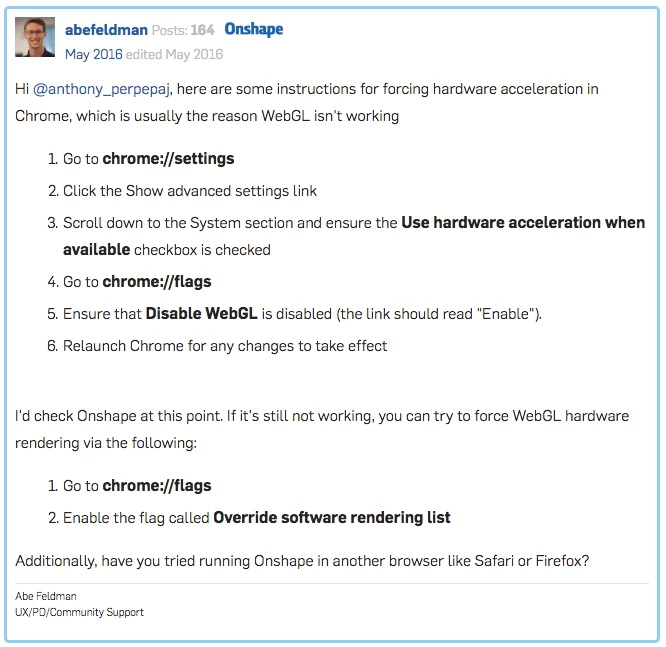
Restarted chrome browser and checked my 'prototype link' again. Prototype on Chrome now displayed okay.

This topic has been closed for replies.

8 replies

laurenc99340755
Participant
August 15, 2019

This is happening to us on mobile and I can't access the advanced WebGL settings on mobile to fix it. It's happening on Chrome, Safari, and Firefox mobile; they're all fine on web just not on mobile.  Atul_Saini is there an Adobe fix for this?

Participant
September 25, 2019
Yes! I’m having the same issue and it’s driving me nucking futs!!! No issues on a PC, only on mobile. FIX IT!!!
Participating Frequently
December 9, 2018

I've just had this happen as well. Sent a prototyoe to a client and they just get a blank screen as per the screenshot in original post. I'm not asking my client to go digging around in Chrome settings to get this to work, that's not a feasible solution.

Participant
November 6, 2018

Same issue for me. Was working fine - now not. I'm looking at a shared prototype. I can still see it on my Macbook but not the iMac in Chrome. Works in Safari. Checked the settings and all OK as per above. Help adobe???

Participant
September 24, 2018

Agree this is not a great "Xperience".

I did not want to put my client through the task of the patch...so gave them options for browsers.

Much quicker solution and it worked.

Meantime, I hope Adobe is able to get beyond this.

Participant
September 24, 2018

I have just experienced this same issue today, and have followed the steps to update my settings with no luck.

My page is partially rendering.

Participant
August 24, 2018

This problem is not "Assumed Answered." It's still going on. Does Adobe expect our clients to know how to change their browser settings just to see our prototype? Not a good "Xperience"

Atul_Saini
Legend
August 25, 2018

Thanks for the feedback on this issue Magnelume. Could you please confirm if you have tried to use the steps shared by the original poster?

Thanks,

Atul_Saini

Participant
August 25, 2018

I did and it worked for me... My concern is when I send prototype link to someone, I will never be certain they will be able to see it and that's a bad experience for my client. I now send them exported jpegs like a caveman (jk)..

UXPaul
Participant
June 21, 2018

Yes ok. Your prototypes show now correctly on your desktop. But what about when you want to share with someone else? This person will then also need to change configurations on his browser? This is not a good experience for the addressee and and I really hope Adobe will look into this soon and fix it.

For me and my way of working, this is a major issue which is not solved by just changing browser settings.

forhueAuthor
Participant
June 21, 2018

Hahah! Yes! I have thought of that. 

The inconvenience comes when you forward the link to other people-- your clients, workmates. They'd need to change their settings too and it will cause a great commotion if you, as the owner of the link is NOT AWARE of this issue and this alternative fix.

Totally agree, Adobe should find a way to solve this, they should not settle on this patch solution. 

Atul_Saini
Legend
June 20, 2018

Hi Forhue, thanks for sharing the resolution, it is going to help our future visitors.

Participant
July 23, 2018

Hello!

This problem continues to happen when I open my link on Chrome (Windows).

I followed the steps but even though...

There is any other solution? I think is really unconfortable not to know if the prototype will be 100% okay or will be show a white screen to the client :/