


Shekoz777
Participant
August 11, 2020
Answered

mask with shape on windows

  • August 11, 2020
  • 2 replies
  • 785 views

hey guys 

Can someone help me to find how to mask shapes on my windows in adobe xd ? 

 i dont know which buttons to press ?

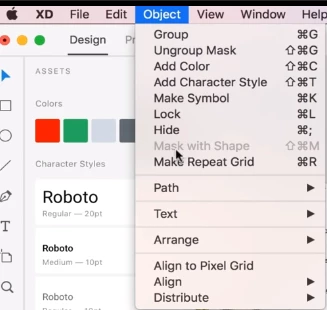
and where can i find this bar in windows also ?


This topic has been closed for replies.
Correct answer mhiremat@adobe.com

Hello Shekoz777,

Thank you and Welcome to the XD.

1.Create two shapes select both by using mouse and using short cut key Shift+Ctrl+M, Mask with shape is applied for the objects.
2.Take an image + create a shape by using mouse, and by using short cut keys Shift+Ctrl+M, Mask with the shape is applied.
3. Mask with shape works for multiple objects, means either for two shapes or shape(object) + image.
2. Shortcut keys for using mask with shape in windows- Shift+Ctrl+M.


Regards,
Ashwini M Hiremath.

2 replies

Shekoz777
Shekoz777Author
Participant
August 12, 2020

Thanks Mhiremat

You helped me alot and it works

Community Manager
August 11, 2020

Helllo Shekoz777,

Here are the steps while creating an object with mask shapes..

Create an objcet/shape, drop an image on top of the shape, select both and right click & choose mask with shape / with shorcut keys(Shift+Ctrl+M), Or on image draw a shape select both and choose the option mask with shape..

Combination of objects(shapes)& images - Works.
Combination of Object(shapes)+ Objects- Works..

Hope it helps.

Regards,

Ashwini M Hiremath

Shekoz777
Shekoz777Author
Participant
August 12, 2020


i dont understand this sentence  " Combination of objects(shapes)& images - Works.
Combination of Object(shapes)+ Objects- Works.. "

Could you explain to me ?

Because iam beginner to the adobe xd .

Thanks for your Patience .

mhiremat@adobe.comCommunity ManagerCorrect answer
Community Manager
August 12, 2020

Hello Shekoz777,

Thank you and Welcome to the XD.

1.Create two shapes select both by using mouse and using short cut key Shift+Ctrl+M, Mask with shape is applied for the objects.
2.Take an image + create a shape by using mouse, and by using short cut keys Shift+Ctrl+M, Mask with the shape is applied.
3. Mask with shape works for multiple objects, means either for two shapes or shape(object) + image.
2. Shortcut keys for using mask with shape in windows- Shift+Ctrl+M.


Regards,
Ashwini M Hiremath.
