Participant
November 12, 2018
Question

Missing fonts

  • November 12, 2018
  • 2 replies
  • 768 views

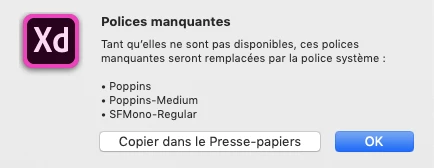
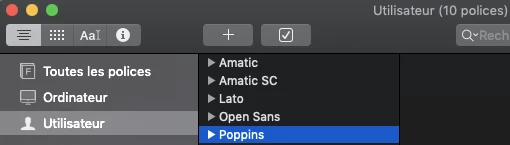
When I load a Sketch file with XD, I have a "Missing fonts" window while the font is indeed installed on my Mac fonts. I can't find any way to replace it or to tell XD where the font is located. Here is an example with "poppins" font :
This topic has been closed for replies.

2 replies

Participating Frequently
December 20, 2018

Problem is global because 3 month ago fonts in XD working normal, last 3 update no support adobe fonts or fonts install with nexus fonts, working only windows font. Please support all fonts because Adobe XD with bug fonts is unhelpful

Preran
Legend
December 20, 2018

I found a forum post on the InDesign forum where there were workaround solutions for the Nexus fonts. Anyone use NexusFont?

Can you try and let us know if it helped?

Thanks,

Preran

Participating Frequently
December 20, 2018

We did not understand each other.

The way to use NexusFont I know and works very well all the time with Photoshop, Illustrator, InDesign, it was similar with XD but when 3 last updates were not released, which caused the problem and the program became unusable.

Adobe XD in its current version works only with installed window fonts, does not support those loaded by NexusFont or what is already absurdity available from Adobe Fonts.

Preran
Legend
November 12, 2018

Just in case you have another computer running Adobe XD, can you try and let us know if you are able to reproduce the issue?

Alternatively, you can share your file with us for investigation. To share the file, you can upload it to a shared location such as CC or Dropbox and share it with us over a private message. To send a private message, click my picture and use the message button.

Thanks,

Preran