


Participant
May 19, 2021
Question

Missing Fonts on Desktop XD

  • May 19, 2021
  • 1 reply
  • 953 views

Hello, 

I have issues lately within Fonts.

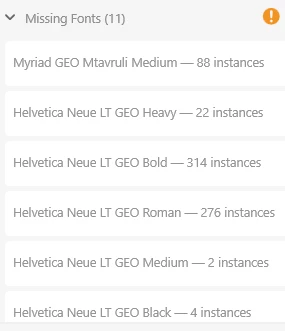
Last two opening end up with Fonts Missing, so i have to install the fonts again and then ADOBE XD can locate the fonts and the error is gone, however in reality the fonts are installed and working perfectly in other applications.

Using Adobe XD Desktop Version on Windows 10, X64
Any support would be highly appreicated


    This topic has been closed for replies.

    1 reply

    Community Expert
    May 20, 2021

    Hi Levank,
    do you use a font manager? What version of Adobe XD are you using it?

    levankAuthor
    Participant
    May 20, 2021

    Hello, 

    I am using version 40 as stated on the screen.

    I don't use any font manager, as said it is shows " Fonts Missing"on both location


    Harshika Verma
    Community Manager
    Community Manager
    May 20, 2021

    Thanks for sharing the screenshot. It looks like this is a third-party font as Adobe Fonts doesn't have this font. We would request you to please try these steps-


    • Open font manager (Example-an old copy of Extensis Suitcase Fusion)
    • Deactivate fonts
    • Reactivate fonts
    • Open the file in XD. You should be able to see the fonts displayed.


    I would also request you to please check if the fonts are located here: C: Windows/ Fonts


    Let us know if that helps.

    Thanks,

    Harshika