
Participant
September 25, 2020
Answered

Missing Glyphs in SF Fonts on Windows

  • September 25, 2020
  • 1 reply
  • 1764 views

I've installed the OTF fonts from Apple for UI design on my PC—SF Compact, SF Compact Round, SF Pro. The majority of the glyphs appear just fine. However, all of the symbol glpyhs are missing.
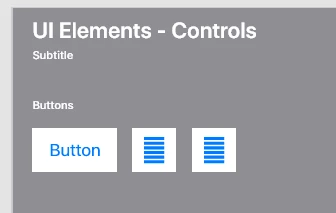

They are represented by what looks like a 6-layer hamburger.

What's happening? Are these OTF fonts deviating from the standard?

    This topic has been closed for replies.
    Correct answer HARSHIKA_VERMA

    Sorry for the delay in response. I assume this is happening because of this- https://adobexd.uservoice.com/forums/353007-adobe-xd-feature-requests/suggestions/38412220-support-for-sf-symbols


    Please check out the UserVoice link and see if that helps. If yes, please submit your feedback and upvote the request to add your voice.


    Hope it helps.


    Thanks,

    Harshika

    1 reply

    HARSHIKA_VERMA
    Community Manager
    Community Manager
    September 25, 2020

    Hi there,


    Thanks for reaching out. Would you mind telling us in which Adobe application you are facing the issue? 


    We will try our best to help.


    Thanks,

    Harshika

    Participant
    September 26, 2020

    Adobe XD on Win10.