
Participant
January 24, 2021
Answered

Most recent file gone missing after being asked to log back in

  • January 24, 2021
  • 1 reply
  • 437 views

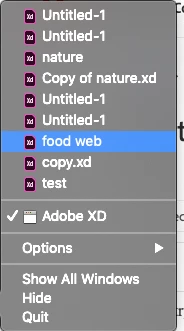
After trying to open Adobe XD, I was asked to log in again and once I did, I was able to see all my projects except for my most recent one, I can see it when I right click (its the one named food web) but nothing happens when I try to open it. I didn't find anything on https://assets.adobe.com/cloud-documents , It's a local file, I have tried going to ~/Library/Application Support/Adobe/Adobe XD CC but I didn't find any file named "food web" there. What can I do? How do I retreive back my file?
This topic has been closed for replies.
Correct answer Harshika Verma

Hi there, 


Sorry for the delay in response. I would request you to please sign out of XD, Creative Cloud, restart the machine and then sign back in and see if that helps. Please make sure you are using the current version of XD 36.2 for better performance and more features.


If that doesn't help, please try connecting with our support team using this link: https://helpx.adobe.com/contact.html and our assisted support team will help you.


Thanks,

Harshika


1 reply

Participant
January 24, 2021

I'm using MacOS Mojave 10.14.6

adobe XD version 24.0.22.19 (starter), creative cloud sync 4.3.71.1

Harshika Verma
Community Manager
Harshika VermaCommunity ManagerCorrect answer
Community Manager
February 3, 2021

Hi there, 


Sorry for the delay in response. I would request you to please sign out of XD, Creative Cloud, restart the machine and then sign back in and see if that helps. Please make sure you are using the current version of XD 36.2 for better performance and more features.


If that doesn't help, please try connecting with our support team using this link: https://helpx.adobe.com/contact.html and our assisted support team will help you.


Thanks,

Harshika