Hi davidicus_RYOT -
Sorry for any confusion this has caused.
Are you able to consistently reproduce the results you described where selecting New Link does not actually generate a new URL?
I tried to recreate the scenario you described, but received different results. I've included the steps I used below. If you have time, it would be really helpful if you could review and let me know if there is something I'm missing.
I tried the following steps:
- Create a new XD document (I'm using XD 14.0.42.14 on macOS 10.14.2)
- Select Share -> Share for Review
- Select the checkbox to require a password, enter a valid password, click "Create Public Link".
- XD generates a new URL - "URL1".
- Save the XD file as "MyFile1"
- Use File -> Save As to create a second version of the file, "MyFile2"
At this point, both MyFile1 and MyFile2 are able to update the prototype created in Step 3.
In MyFile1, if I then click "New Link":
- The password field is cleared
- The Require Password box remains checked
- The Create Public Link button is disabled
After entering a valid password, the Create Public Link button becomes enabled.
If I then click Create New Link, a new, unique link is generated - "URL2" - and it does not match URL1.
After creating a new link, I see the success state in the sharing popup, with the embed, copy and open link icons in the top right corner.
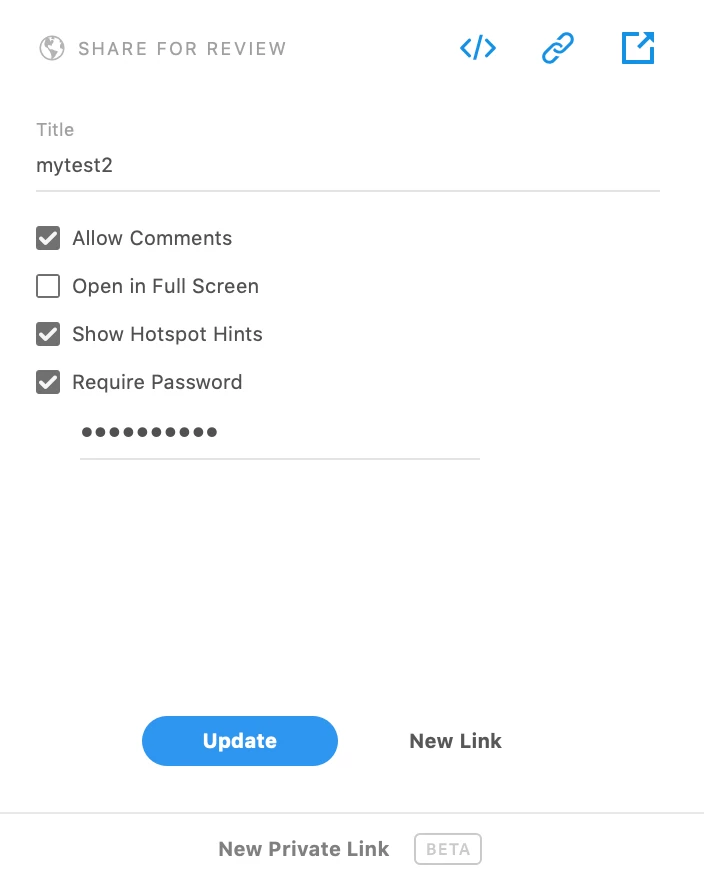
I haven't been able to reproduce what you described: "New Link leads to the panel with no link icon", or New Link not generating a unique URL.
If any of this behavior still reproduces for you, can you share the exact steps you are using, a screen shot of the panel you are seeing without icons, and the URLs you are working with (via email). The URLs will allow us to examine the logs and identify the source of every change.
Thanks for your help!



 AdChoices