


Participant
June 18, 2021
Answered

Nested Components auto-animate bug

  • June 18, 2021
  • 2 replies
  • 811 views

Hi guys,

I have a couple of nested components - everything is named neatly. When using auto-animate the animation happens between 2 random objects... wtf?


What am I doing wrong? Or is this a bug?


See Keyboard Normal and Keyboard Audio - please click on the mic icon. Animation should happen between the mic icons. Instead Animation happens between the "mic icon" and the "enter icon".
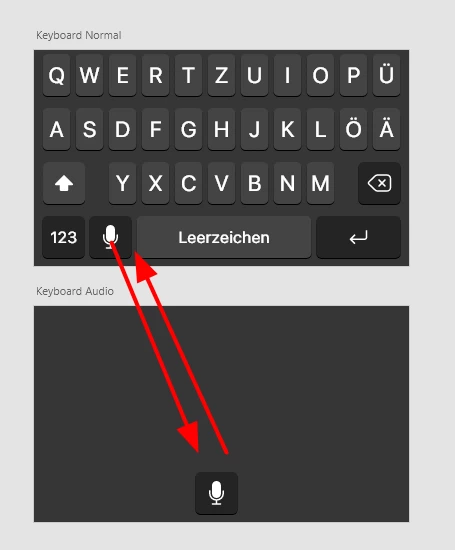



This topic has been closed for replies.
Correct answer Spas K.

Hey there. Between your two artboards, the other elements of the component are missing, so Xd doesn't know what to do with them (is what I'm assuming). I've fixed it for you. But in general it's not a good idea to animate like that - between two artboards, and at the same time using two different instances.


Either animate between two artboards without the container component, or use component states. I've added the component states solution in there as well.


Here's the file.


PS. You can't link a nested component to another state of the container component. You need to put it in a group first, and link that group to the second state. You can see that in the "Component states" solution in the file.

2 replies

Spas K.
Community Expert
Spas K.Community ExpertCorrect answer
Community Expert
June 20, 2021

Hey there. Between your two artboards, the other elements of the component are missing, so Xd doesn't know what to do with them (is what I'm assuming). I've fixed it for you. But in general it's not a good idea to animate like that - between two artboards, and at the same time using two different instances.


Either animate between two artboards without the container component, or use component states. I've added the component states solution in there as well.


Here's the file.


PS. You can't link a nested component to another state of the container component. You need to put it in a group first, and link that group to the second state. You can see that in the "Component states" solution in the file.

Participant
June 21, 2021

Appreciate it. Thanks a lot!

Participant
June 18, 2021

sorry - forgot the file: https://we.tl/t-sGiZ0lEyfj