
Inspiring
September 30, 2020
Answered

New feature 'Multiple Flows' does not work

  • September 30, 2020
  • 2 replies
  • 2663 views

The multiple flows feature does not work. In my document I have two flows with different labels (Flow 1 and Flow 2). They show in the 'Share' panel as flows as 'Flow 1' listed twice.


Any edits to either flow results with the same flow for both flows.


This is a serious issue. I cannot edit the flows properly. I don't want multiple documents to track flows coupled with multiple URLs to track of if there are comments too. These features are beta/experimental at best. Don't push these releases until they have been vetted.


There needs to be better management of the published URLs especially for co-editing. Please allow for using an Invision style plug-in so I can have one URL that can be managed by multiple users. It may be a manual process, but at least it will keep it together under one URL and I can have multiple authors make edits.
    This topic has been closed for replies.
    Correct answer Spas K.

    So the added files to the flow were uploaded, just not in the order of the flow.

    The flow does work,  they were uploaded left to right top to bottom. 

    Is there a way to change the. order of the slides? Do I have to change the physical order in the file?


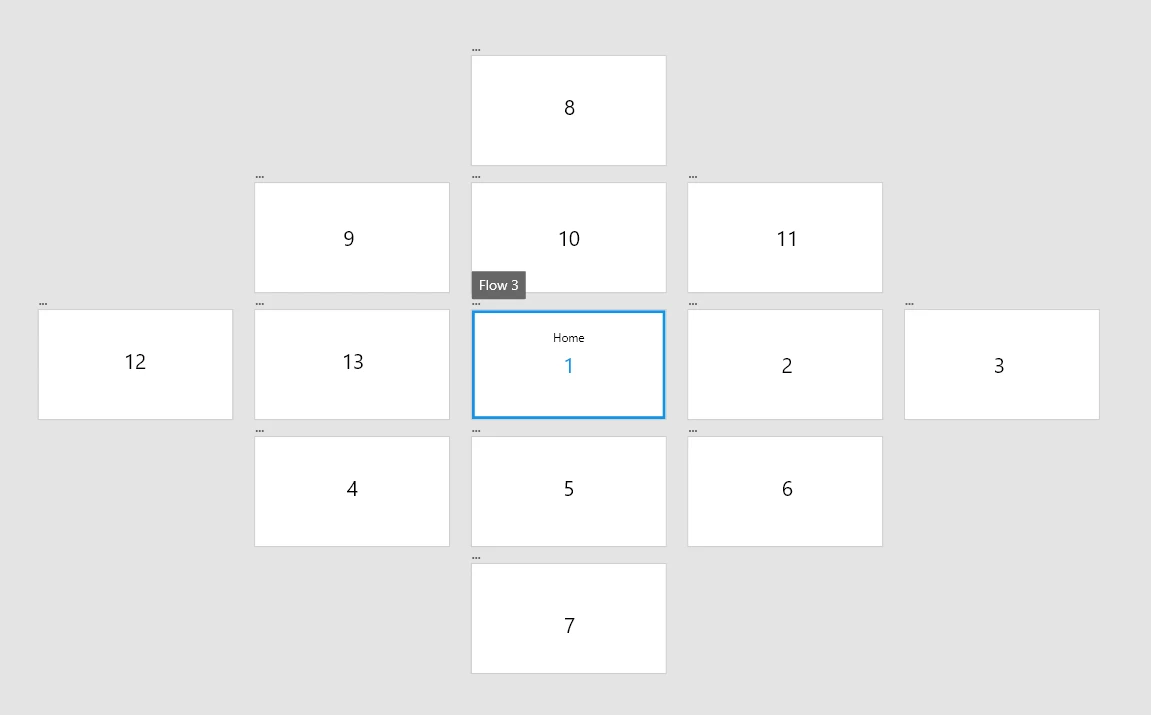
    Fiddled with it a bit to be sure, but yes, Xd seems to only count the positioning of the artboards relative to the Home artboard for that flow. The order in which they were added or the direction of the flow don't matter.


    This seems to be the order:

    1. All the artboards to the right of Home (on the same level).

    2. Any artboards below Home (respective of left to right).

    3. Any artboards above Home.

    4. Artboards to the left (but not below) of Home.


    I assume they didn't make it in the direction of the flow, because flows aren't always linear, and you tend to order artboards in some hierarchy, with the main ones being on the top left.


    Hopefully that helps.

    2 replies

    Dai5FBBAuthor
    Inspiring
    September 30, 2020

    So there are some things to be aware of when using multiple flows. If your flows divate from the other pages than the home page you need to duplicate the artboards to link to new flows because it will try to use the existing flow. If you edit the second flow off of any page not the home page, it will jack up the first flow. So this feature is very limited and requires a lot of work around to manage multiple artboards even if they are duplicates.

    Spas K.
    Community Expert
    Community Expert
    September 30, 2020

    These (Flow 1, Flow 1) are links you already created.


    1. First from that dropdown, select "New Link".

    2. Then in your viewport, click on the flow you want to export (on the Flow 2 Label over the first artboard)

    3. When you select a different flow, you will be able to make a link for it. 


    Hope this helps.

    Cheers!


    Dai5FBBAuthor
    Inspiring
    September 30, 2020

    Thank you, I guess I am not communicating why this issue happened. 

    It does not show up for me to create 'Flow 2', so I accidently created the 'Flow 1' twice.

    Also when I add new screens to the flow, they are not added when published.

    Spas K.
    Community Expert
    Community Expert
    September 30, 2020

    A new flow is created when you click on the "Home" button on any artboard.

    You click on it, and any arboards the current one leads to, as well as their connections, become a part of that flow.


    What you see in that dropdown up there are links, you cannot create a flow from there. You can only manage links you already created, or make new ones for the selected flow on the left, highlighted in blue.


    I agree, however, that it can be confusing.


    On the other part, I just tested it, and when I add more pages to my flow, and update its link, the new pages show up when I reload the link in the browser.


    Perhaps you can record a video of your process, so I can see where you might be doing something wrong, and I can help you with setting it up.