

compartista
Inspiring
September 27, 2022
Answered

Newby to XD

  • September 27, 2022
  • 3 replies
  • 495 views

So, I  just started yesterday.  I have a few questions? Are you supposed to layer each artboard and group them and name them?


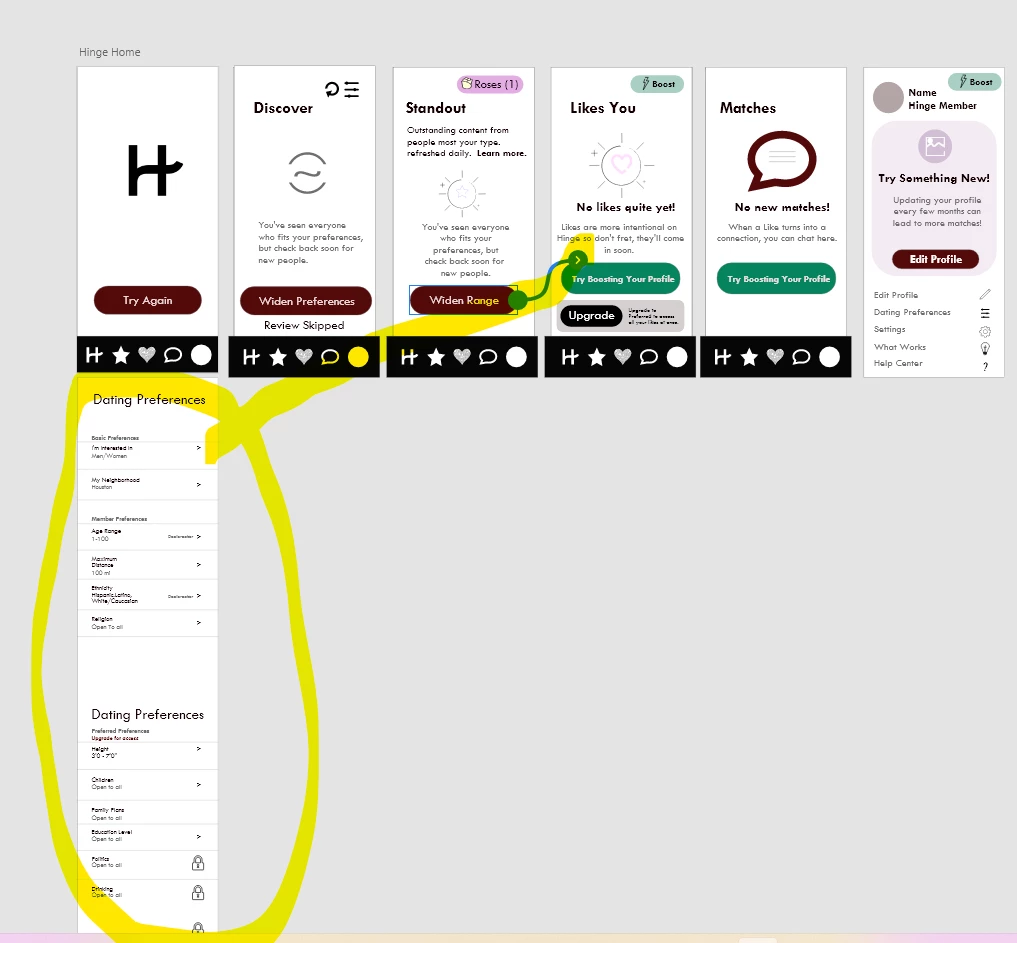
2) I am trying to link one of my buttons to another artboard and for some reason it won't? What am I doing wrong?  I am creating the Hinge Dating App just for practice, I think it looks good, but I watched the video about linking and the little cords, but it seems that when I put the cursor on the button the little blue thing on the side allows for the cord to come out but when I send the cord to where it needs to link to, I get nothing? submittming a photo for all you visual learners. lol. As you can see I'm trying to link preferences to the widen your view button, Nothing!
 

It's fun I'm enjoying it!

    This topic has been closed for replies.
    Correct answer Dan Rodney

    Agreed, use the Artboard tool to make the artboard (using a preset which you'll see in the Properties panel on the right). You can then increase the height as needed to allow content to scroll. Things like your tab bar can be placed along the blue line which indiciates the bottom of the screen and set to a fixed position so they won't scroll but the rest of the content will.

    3 replies

    compartista
    Inspiring
    September 29, 2022

    THANK YOU GUYS!  It worked! I can't believe how that was such an easy fix, I thougth I was using artboards.  I did as you said, and used a preset artboard and now I am able to link the buton to where it needed to go.  I wanted this to go to all of you so I hope you are getting this reply as a thanks to all! 

    Dan Rodney
    Community Expert
    Community Expert
    September 29, 2022

    Glad to hear you got it working. Have fun designing!

    — Adobe Certified Expert & Instructor at Noble Desktop | Web Developer, Designer, InDesign Scriptor
    HARSHIKA_VERMA
    Community Manager
    Community Manager
    September 28, 2022

    Hi @compartista,


    Welcome to the Adobe XD Community!


    Thank you for reaching out and using Adobe XD and thanks for sharing the screenshot of your design. It looks like the screens are not artboards.  Please ensure that you create your design on the artboard and not on the pasteboard. You can see in the layers if those elements are on the pasteboard or their own art board.


    Let us know if that helps.


    Thanks,

    Harshika


    Dan Rodney
    Community Expert
    Dan RodneyCommunity ExpertCorrect answer
    Community Expert
    September 29, 2022

    Agreed, use the Artboard tool to make the artboard (using a preset which you'll see in the Properties panel on the right). You can then increase the height as needed to allow content to scroll. Things like your tab bar can be placed along the blue line which indiciates the bottom of the screen and set to a fixed position so they won't scroll but the rest of the content will.

    — Adobe Certified Expert & Instructor at Noble Desktop | Web Developer, Designer, InDesign Scriptor
    rayek.elfin
    Legend
    September 27, 2022

    Perhaps it is a better idea to start learning Figma? Adobe is in the process of acquiring Figma for 20 billion $$$, and XD will be discontinued.