
Participant
November 23, 2022
Question

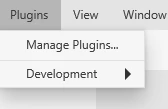
No "Discover plugins" tab in Plugins menu

  • November 23, 2022
  • 1 reply
  • 1243 views

Hello,


I am unable to install plugins on Adobe XD because the option simply doesn't exist, as seen on the screenshot. I have tried everything I found online, in vain (signing out of CC and XD, killing all Adobe related processes, rebooting...)


Thank you for your help.


    This topic has been closed for replies.

    1 reply

    HARSHIKA_VERMA
    Community Manager
    Community Manager
    November 23, 2022

    Hi @Benjamin27271330msba,


    Thank you for reaching out. Would you mind checking if you see the + icon in the plugin tab, as shown in the screenshot below?


    If that doesn't appear, please try reinstalling XD and let us know if that helps.


    Thanks,

    Harshika

    Participant
    November 23, 2022

    Hello,

    Thank you for your answer. I don't have that + icon, and unfortunately reinstalling did not change anything.

    Benjamin

    HARSHIKA_VERMA
    Community Manager
    Community Manager
    November 23, 2022

    Hi @Benjamin27271330msba,


    I checked your account, and it looks like you're on an Enterprise account. I assume your organization might have disabled the plugin settings. Could you please create a case or initiate a chat from the Admin Console's support tab if you're a System or Support administrator using this link: https://helpx.adobe.com/contact/enterprise-support.cc.html?

     
    If not, then contact your admin and ask them to create a case or start chatting through the admin console.


    Let us know if that helps.


    Thanks,

    Harshika