


Amor Humanity
Participant
March 16, 2026
Question

No fonts available on XD
  • March 16, 2026
  • 1 reply
  • 36 views
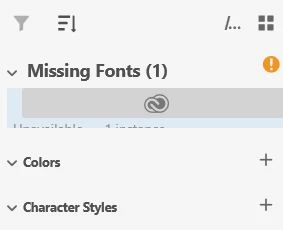
Missting Fonts Example
 

I have installed & reinstalled XD because making any text results in a missing font error.  There are no fonts in the drop down where they should be. And there is no option to replace fonts when I right click over the text.  Then there is the issue that the Missing Fonts dropdown doesn’t dropdown & show what is written under the icon.  All I can see if the creative suite icon & the top of some text.

Windows 11 Updated
Fresh XD installs

    1 reply

    Spas K.
    Community Expert
    Community Expert
    March 19, 2026

    Did you try logging out of your Creative Cloud account and then logging back in?

    I assume it happens on all files? 

    Amor Humanity
    Participant
    March 20, 2026

    It is only happening on XD files.

    Spas K.
    Community Expert
    Community Expert
    March 23, 2026

    I see, can you post a screenshot of the whole window, with a new document, and a text element created / selected? You said you can’t type any text either, correct? When did this issue start happening exactly?

    Are you using some font manager application on your machine?

    Otherwise, a last resort would be reinstalling everything, including the Creative Cloud app, and using the Creative Cloud cleaner tool to get rid of any residual corrupted configuration, cached files, etc.

    You have options with it on what exactly to remove, but I cannot say what will work best. Removing everything is likely the most effective, but you’ll have to make sure you back up the configurations of other apps so you don’t lose that. It’s a hassle for sure, so you can try the Creative Cloud only, credentials or hosts file options first, see if that fixes it.