Participant
April 5, 2022
Question

No Fonts Working IN Adobe XD

  • April 5, 2022
  • 3 replies
  • 669 views


Hi,

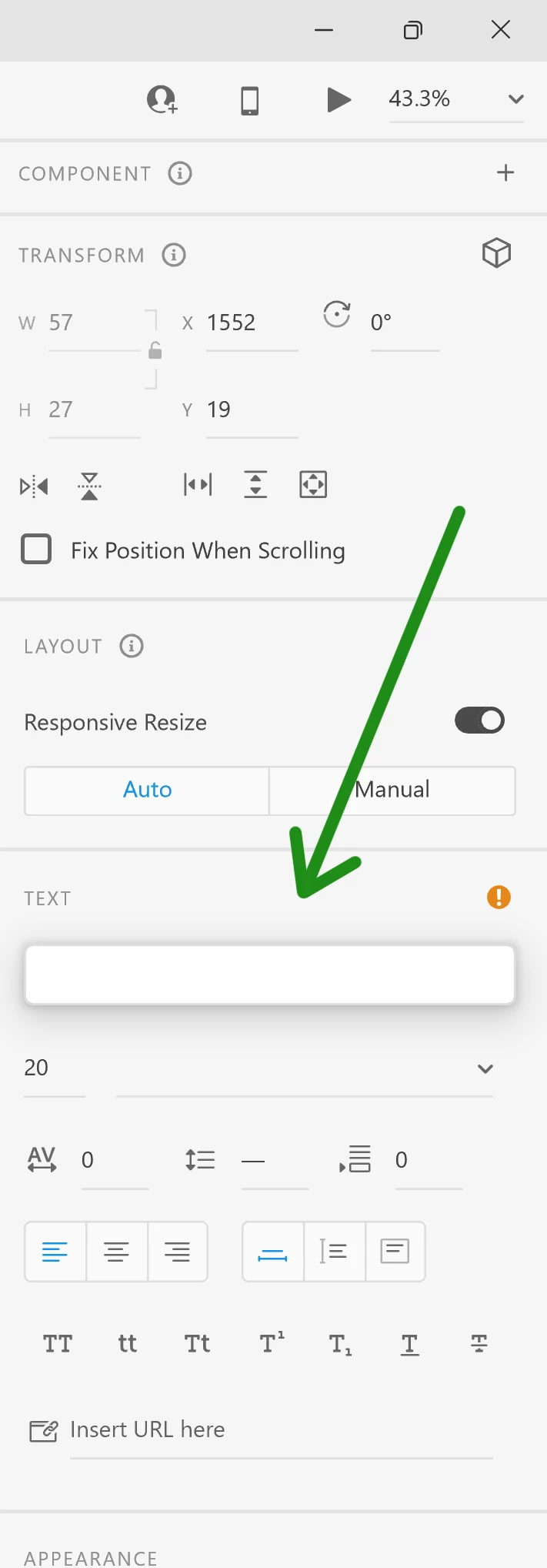
No fonts are working in Adobe XD. I am using Windows 11 and XD version 49.0.12

This topic has been closed for replies.

3 replies

G-Wizzard
Participant
October 10, 2022

I found the solution on my own. Under document assets it said missing fonts (1). When I clicked to correct the issue, no font was listed. I chose replace font and it then let me choose a font, but still did not explain which font was missing. I simply chose a font. Once I chose a font, then the font list populated as normal.


TLDR;

Replace missing fonts before any fonts can be listed.

G-Wizzard
Participant
October 10, 2022

I have this exact same problem. I am running Windows 11 the latest version with all updates. I have restarted the computer several times and only launch XD from the CC Apps button. I have no fonts listed anywhere in XD. It looks exactly like the image posted by OP.

G-Wizzard
Participant
October 10, 2022

I also tried uninstalling and installing a previous version. However, the previous version was unable to open my files saying "this file was created with a newer version." I am stuck with no fonts whatsoever in Adobe Xd only. All other Adobe and Windows apps show the fonts correctly.

Chaitanya21936374hmkf
Community Manager
Community Manager
April 6, 2022

Hi Shmuel.M,

Sorry for the inconvenience caused, I am not able to reproduce this issue on my Win 11.
Could you please provide me more details on this:

1. Is it happening with one particular font or with all missing fonts.

2. Is this file specific.

3. It will be helpful if you can provide small video of the workflow.


Also please do try below steps, it might resolve your issue:

  1. Sign out of XD and CC Desktop.
  2. Close CoreSync and all Adobe-related processes from the Task Manager.
  3. Please reboot the computer.
  4. Sign back in on the CC Desktop app and launch XD from there.


Thanks & Regards,

Chaitanya

Shmuel.MAuthor
Participant
April 7, 2022

Thanks for your response.

These didn't resolve the issue. For now I installed version 48 and I don't have the issue.

Chaitanya21936374hmkf
Community Manager
Community Manager
April 12, 2022

Hi There,

The lastest version of XD has been released please try out with XD-50, it has some important fixes.


Thanks & Regards,

Chaitanya