


Participant
April 15, 2021
Answered

No project preview shows before opening file (BUG)

  • April 15, 2021
  • 1 reply
  • 409 views

Hello!

I cannot see what my project looks like before opening an Adobe XD file.
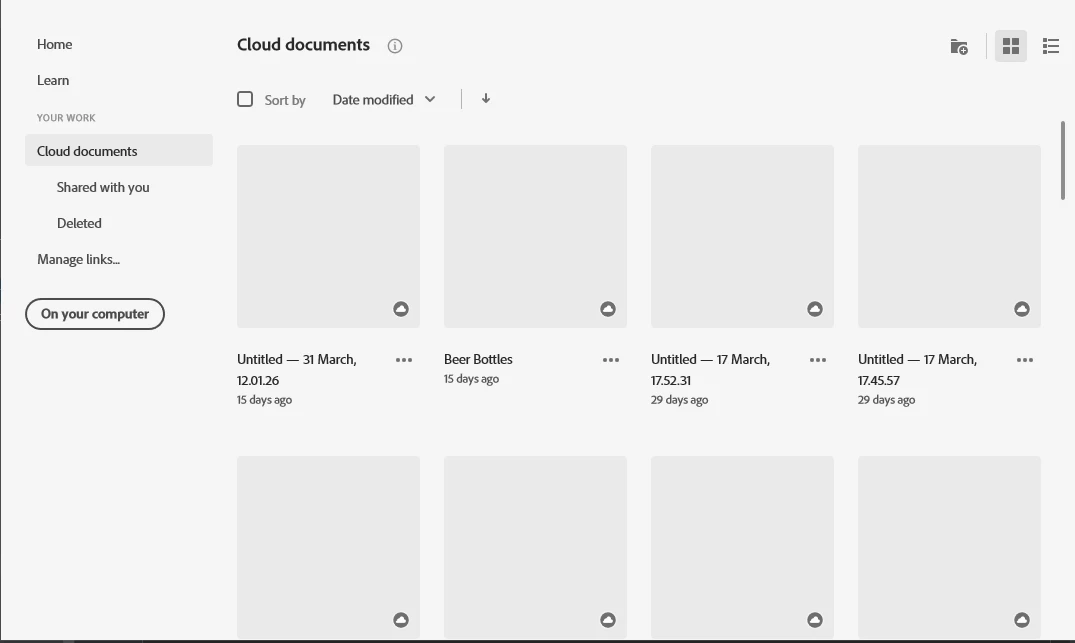
 

I have this problem since I reset my Windows PC with Keeping my files.

To try and solve this issue, I have tried multple things.

 - Reinstall Adobe XD

 - Uninstall Adobe XD -> uninstall Creative Cloud -> install creative cloud -> install adobe XD

 - I also used the Adobe Clean removal tool to remove any Adobe related files before installing again.


None of the above solve this issue. Not having this preview of a project is quite bothersome, because I create a lot of project, and I cannot remember them all by name.


I have looked for hours for a solution, but I can't seem to find any posts related to this issue.


Does anyone have a solution for this?

    This topic has been closed for replies.
    Correct answer Maarten0D44

    Well its me again. I can't seem to find the delete button for this post. Anyway, the issue somehow solved itsself now.

    I did 2 things:

     - I updated to the newest Adobe XD: XD v 39.0.12

     - I actually clicked for the first time on "Your Work" tab in Adobe Creative Cloud, where the preview works for my projects. So I suppose it now has correctly cached these previews for my projects, and it works as well in Adobe XD!


    I suppose this post can be deleted now, or marked as solved?


    Kind Regards,

    Maarten

    1 reply

    Maarten0D44AuthorCorrect answer
    Participant
    April 15, 2021

    Well its me again. I can't seem to find the delete button for this post. Anyway, the issue somehow solved itsself now.

    I did 2 things:

     - I updated to the newest Adobe XD: XD v 39.0.12

     - I actually clicked for the first time on "Your Work" tab in Adobe Creative Cloud, where the preview works for my projects. So I suppose it now has correctly cached these previews for my projects, and it works as well in Adobe XD!


    I suppose this post can be deleted now, or marked as solved?


    Kind Regards,

    Maarten