
Participant
September 13, 2022
Answered

Object menu opening upwards outside the window

  • September 13, 2022
  • 1 reply
  • 642 views

I have installed Adobe XD ver. 54.1.12.1 for Windows 11 and when i click in the menu bar in "object" it opens upward outside the application window, all other menu items open normally downwards. Check it out:
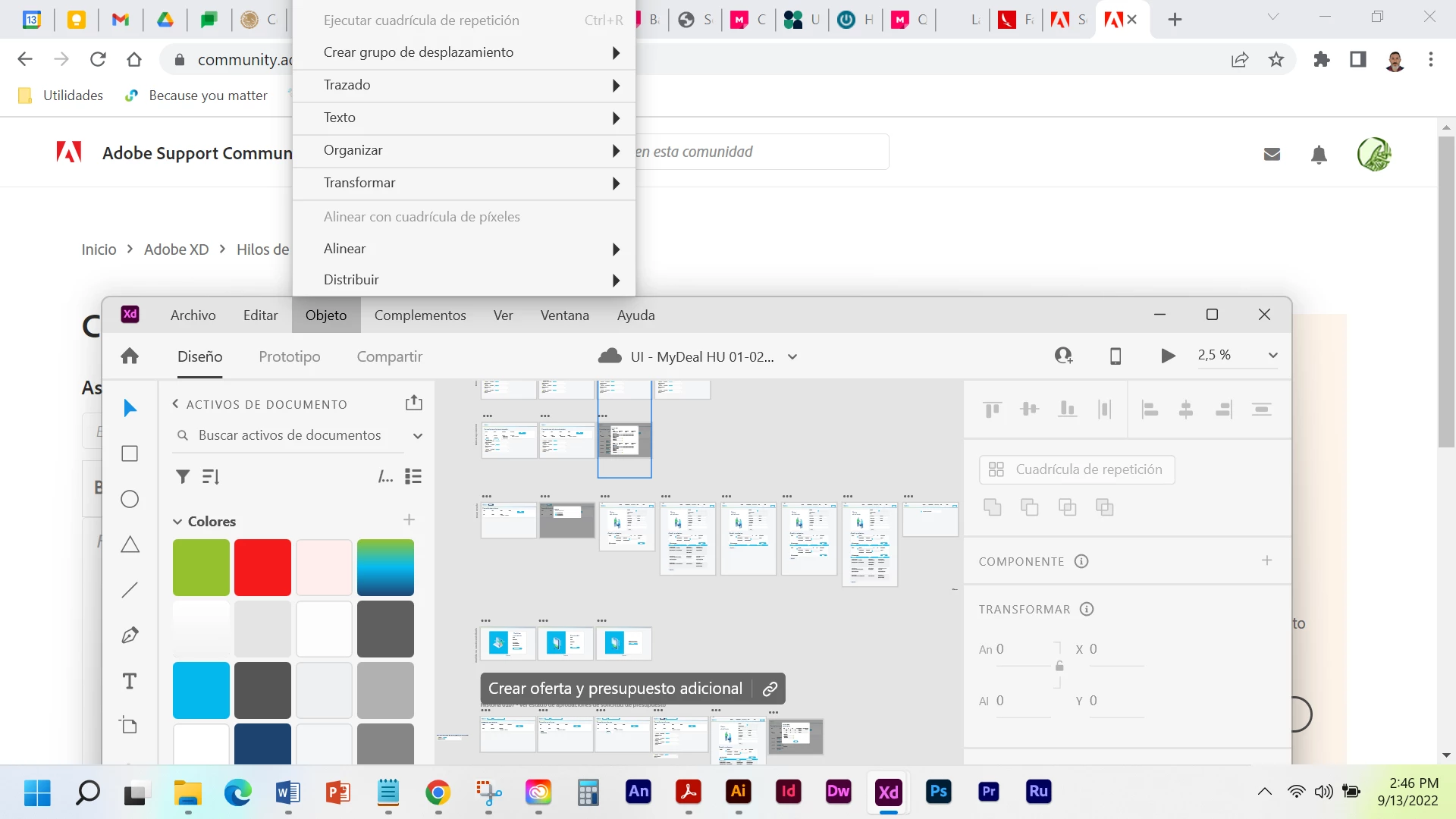
 

i'm using the spanish version just in case... Thanks in advance!

This topic has been closed for replies.
Correct answer Chaitanya21936374hmkf

Hi Juan Rangel Aragón,

Thank you for contacting us and Sorry for thr trouble caused.

As a work around could you please try below steps:

1. Go to the setting
2. Systems
3. Inside System setting go to Display
4. Inside Scale & Layout click on Scale dropdown and set it to 100 or 125 %.
Hope this help you to continue your work. Sorry for the inconvience caused.

Thanks & Regards,

Chaitanya Shandilya

1 reply

Community Manager
September 14, 2022

HI Aragón,

Thank you for contacting us and Sorry for thr trouble caused. This issue is already raised and actively on it to fixing, you will be able to see the fixes in future release.

Regards,

Ashwini.

Chaitanya21936374hmkf
Community Manager
Chaitanya21936374hmkfCommunity ManagerCorrect answer
Community Manager
September 14, 2022

Hi Juan Rangel Aragón,

Thank you for contacting us and Sorry for thr trouble caused.

As a work around could you please try below steps:

1. Go to the setting
2. Systems
3. Inside System setting go to Display
4. Inside Scale & Layout click on Scale dropdown and set it to 100 or 125 %.
Hope this help you to continue your work. Sorry for the inconvience caused.

Thanks & Regards,

Chaitanya Shandilya

HARSHIKA_VERMA
Community Manager
Community Manager
September 22, 2022

Hi @Juan Rangel Aragón,


Hope you're doing well!


We would like to follow up on your issue. Are you able to work around the issue by following our expert's advice? You may definitely see the improvements in future releases of XD.


Thanks,

Harshika