
Inspiring
September 28, 2020
Answered

Objects in prototype in wrong position when sharing but not in work file.

  • September 28, 2020
  • 1 reply
  • 473 views

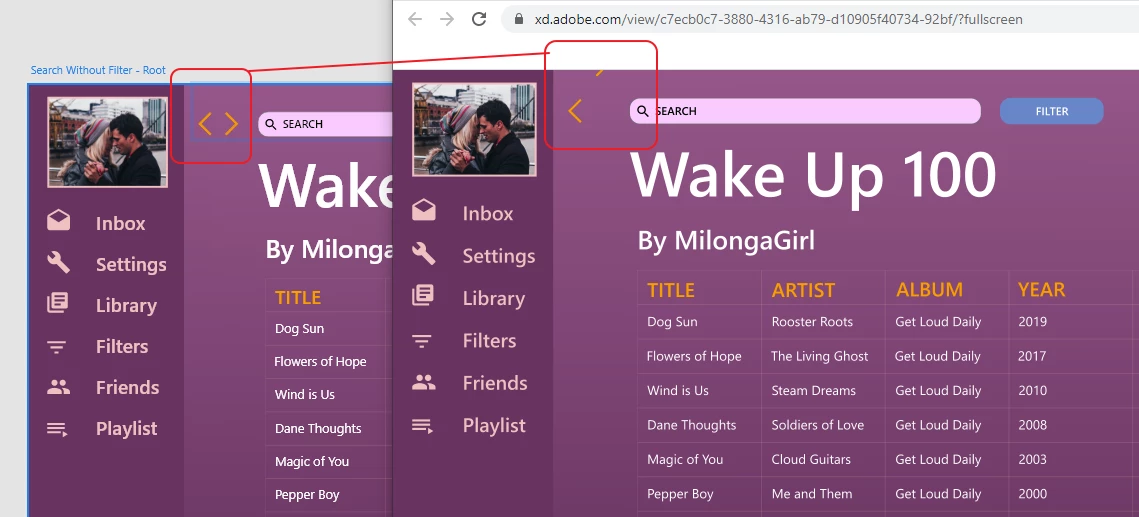
I just shared my prototype, and in the shared linke the arrows control is completely messed up, but within XD, both in design and prototype, it looks fine. What's happening? Tried refreshing.. all that cookies, and remaking the project...


    This topic has been closed for replies.
    Correct answer Dai5FBB

    Have the same issue, doesn't matter if its a font or object.

    Earlier shares did not have this issue.


    Wonky work around

    I experimented and discovered that I needed to create a new textbox/object to fix the cloud output. Used a find and replace plugin to help speed up the process. Not ideal, and disruptive to my work flow, but at least I can share now.

    1 reply

    Spas K.
    Community Expert
    Community Expert
    September 28, 2020

    Hi Nysteve.


    What kind of an element are the arrows? Are they vectors, or an icon font by chance?

    Also, when you say you tried remaking the project, did you copy everything to a new file and make a new link?


    Will you be able to share the file here? You can just leave that artboard in there, or even just a few elements including the arrows, so we can investigate.


    Dai5FBBCorrect answer
    Inspiring
    September 29, 2020

    Have the same issue, doesn't matter if its a font or object.

    Earlier shares did not have this issue.


    Wonky work around

    I experimented and discovered that I needed to create a new textbox/object to fix the cloud output. Used a find and replace plugin to help speed up the process. Not ideal, and disruptive to my work flow, but at least I can share now.