FlashInPan11531769
Inspiring
June 15, 2020
Resuelto

Opacity Properties In Components

  • June 15, 2020
  • 1 respuesta
  • 3233 visualizaciones
  • I've set up my mobile app design that has a lot of buttons.
  • The button shape/style is a component (cloud-based in case that matters).
  • If I change the opacity property in the master component, it does not translate to all of my instances (local based).

It seems like, of all things, a simple thing like the opacity property should translate to the instances.
I have two questions:

  1. Am I doing something wrong?
  2. If not, is there a work-around?
    Este tema ha sido cerrado para respuestas.
    Mejor respuesta de FlashInPan11531769

    Hi FlashPlan1,

     We are sorry to hear that you are facing issue while using components,

    Here is the workaround for the above mentioned issue, the steps are:
    1. create a component( don't add color/ image/numbers)
    2. drag the instance's from the assets panel / By using short cut key CTRL+ D you can create an instances
    3. now add the color to the component.
    4. in edit mode of the master component, change the opacity property of the master component,  the changed opacity is propogated to all the instance present on the canvas.


    Regards,

    Ashwini M Hiremath.


    Okay, that workaround does sort of work.

    Here is what was happening and I think it may help others out there:


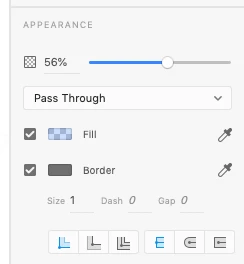
    I was applying the transparency to the master component element as an appearance attribute, using the slider in the inspector (shown below). Applying transparency in this way to a component does not translate to instances.
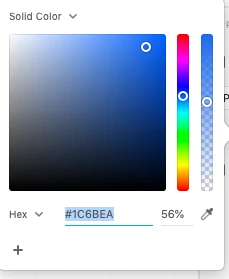
    In order for this to work, the transparency of the color needs to be applied in the color picker of the component element (shown below). When applied in this way, those changes DO propogate to the instances.

    1 respuesta

    Rishabh_Tiwari
    Legend
    June 15, 2020

    Hi there,


    Thanks for reaching out. I tried reproducing this on my end and it seems to be working. Will it be possible for you to share a small video of the workflow and what exactly is happening at your end so that we can test it on our end?


    Regards

    Rishabh


    FlashInPan11531769
    Inspiring
    June 15, 2020

    Sure. Attached is a demonstration of the problem.

    I am using XD version 29.3.32.3, Creative Cloud Sync 4.3.45.2