
Participant
March 23, 2020
Answered

[Other]-Syncing Problem opening cloud document in XD.

  • March 23, 2020
  • 3 replies
  • 18257 views

Hi, I'm having problems opening an XD-document, I'm getting the following message: 
"Waiting for sync. The latest copy of the document has not yet been synced from another computer. Please try again in a few moments."
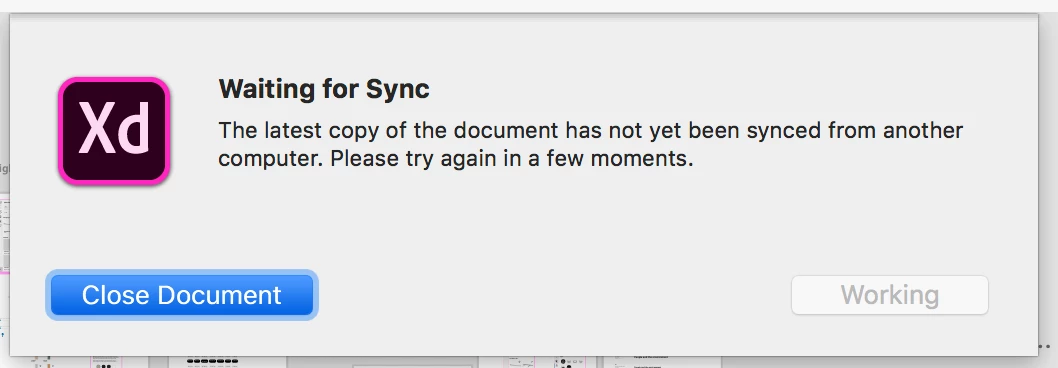
I'm only working on one computer, and I'm the owner/creator of the document. It is shared with another co-worker (co-editing), but she had no problem opening/closing it. I can open earlier versions, so it's not totaly lost, but the link for sharing will be another, which means all linkage to this document needs to be updated. It's a big project, a lot of Jira-boards and a big team of developers that need to have access to the design, so I hope you can see the problem it causes. 
I have the latest version of XD, and I've tried to log-out/log-in again, restarted my computer....and all that mojo... but nothing helps. Anyone that have a solution to my problem?
Thanks!
This topic has been closed for replies.
Correct answer Ares Hovhannesyan

Try to unshare your project.from user. https://xd.adobe.com/view/ee574f00-c018-47ad-6f05-539f2d920d4b-9866/


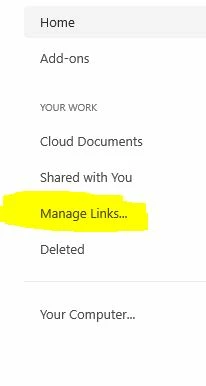
But bofere, open AdobeXD and click on Manage Link and go to you CC files in browsers where you can find your shared project. 

3 replies

Participant
November 2, 2020

@Rishabh_Tiwari @HARSHIKA_VERMA 

I am facing the same issue as Clara. "Syncing..." drawer appearing on the file I share with my team.
- We all use the latest 34.2.12 version.
- All other files sync fine in co-editing mode.
- I have remove my co-worker from the file and uninstall and reinstall XD.
- The problem persists with the "Syncing..." pop-up drawer message (only for this file, other ones are good)
- I can not use a previous version as we need to keep the prototype link that we shared across the developer teams and stakeholders.

Participating Frequently
May 13, 2020

Hi there,


We have a coediting enable file (large file) that no one in the team is able to open it. Some steps:

-File was created a few weeks ago

-Enable coediting

-Invited users to work on the file

- Lots of artboards and images that make the file pretty heavy

- Today, a few designers tried to open the file and we unable

- File loads normally, you can see the blue bar loading

- Then you see the "Connecting..." message

- You see the "Sync" (I think)

- Then you get the message attached "Waiting for sync"


Any workaround? Why is it happening?


TIA

Clara


{Renamed By MOD}

Rishabh_Tiwari
Community Manager
Community Manager
May 13, 2020

Hi Clara,


Sorry to hear about the trouble, we'll try our best to help you with this. Could you please try the suggestions shared on this similar discussion: https://community.adobe.com/t5/adobe-xd/other-syncing-problem-opening-cloud-document-in-xd/m-p/10997451?page=1#M25666


Let us know if this helps or if you need any further assistance.


Regards

Rishabh

Ares Hovhannesyan
Community Expert
Ares HovhannesyanCommunity ExpertCorrect answer
Community Expert
March 23, 2020

Try to unshare your project.from user. https://xd.adobe.com/view/ee574f00-c018-47ad-6f05-539f2d920d4b-9866/


But bofere, open AdobeXD and click on Manage Link and go to you CC files in browsers where you can find your shared project. 

Participant
March 23, 2020

Thanks Ares, your solution with removing the other user seems to have solved the issue. Thanks for the help!