
Participant
September 29, 2020
Answered

Pan around Adobe XD canvas Issue

  • September 29, 2020
  • 1 reply
  • 1513 views

Hello,


I am trying to pan around the XD canvas and it seems that I encounter an issue as it does not move when I hold the mouse button to navigate to another artboard that was out of view. It used to allow me to drag the prototyping link to whatever artboard I wanted. It budges a bit at some point but that is it. It's like it is locked. Is there something that I am missing? 


Please see the video below: 

Version of XD is 33.1.12

    This topic has been closed for replies.
    Correct answer Heimdal2023

    I managed to fix this issue.

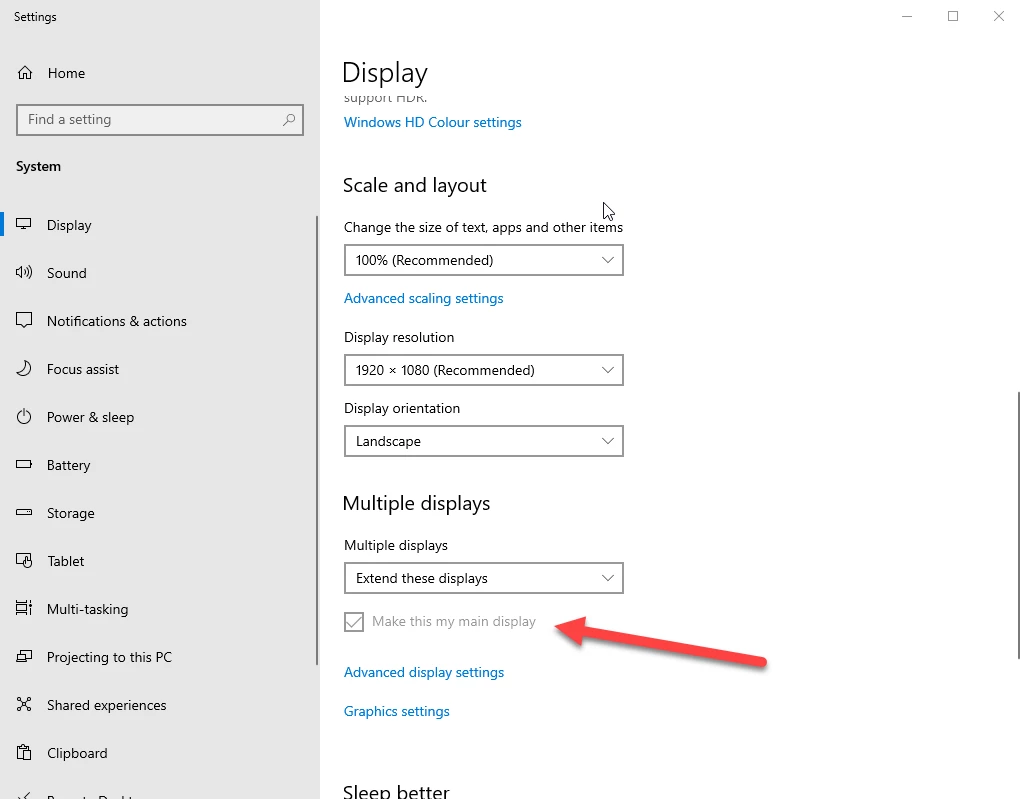
    It seems that I had to go into Display Settings when right-clicking on the desktop and set the monitor's screen as default. If I let the laptop screen as the main screen, the issue persists but if I make the external monitor as the main display, the issue is fixed. Perhaps is a compatibility problem. I have no idea. 


    Thank you for your assistance.


    Cheers


    1 reply

    Rishabh_Tiwari
    Community Manager
    Community Manager
    September 29, 2020

    Hi Adrian,


    Thanks for reaching out. I tried doing the same on my end and it seems to be working fine. So could you please try restarting XD by closing the XD the process from the task manager and then re-launching XD and check if it works? If it still doesn't work, please try re-installing the application and let us know how it goes.


    Regards

    Rishabh

    Participant
    October 1, 2020

    Hello,

    Thank you for the reply and assistance but unfortunately, the issue persists. 

    I tried to:

    - Terminated the process from task manager and re-launched XD

    - Uninstall XD (registry cleaning also as it is a Windows 10 machine.)

    - %temp% folder cleaned

    - Reinstalled XD

    - Everything on the computer is updated. Every driver and windows.


    To mention, I use a laptop and a monitor. It might be an issue with the video driver or double screen or something but I have no idea where to look into this to figure it out. 


    Thank you


    Heimdal2023AuthorCorrect answer
    Participant
    October 1, 2020

    I managed to fix this issue.

    It seems that I had to go into Display Settings when right-clicking on the desktop and set the monitor's screen as default. If I let the laptop screen as the main screen, the issue persists but if I make the external monitor as the main display, the issue is fixed. Perhaps is a compatibility problem. I have no idea. 


    Thank you for your assistance.


    Cheers