


Participant
January 16, 2020
Answered

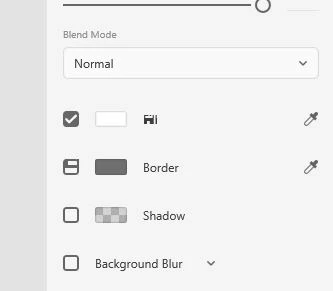
[Panel]-Having weird glitch in the UI, Icons are weird in XD.
  • January 16, 2020
  • 1 reply
  • 1082 views

In the image attached notice the word "Fill" and the checkbox for border, this normally only happens when I've connected my laptop to an external monitor.

Any help is appreciated.


p.s Using XD on windows 10 device


<The Title was renamed by moderator>

This topic has been closed for replies.
Correct answer Shwetha Diwanji

Hi elshiffu_96,


Thank you for using Adobe XD. The glitch in UI related to icons/checkboxes is caused due to icon cache corruption from Microsoft side. The team is already aware of the issue you are referring to and is working on fixing it. You should be able to see the fix in future releases.

Meanwhile, you can close and reopen the document which helps get back all the icons/chekcboxes back to normal.

Hope this helps.


1 reply

Shwetha Diwanji
Community Manager
Shwetha DiwanjiCommunity ManagerCorrect answer
Community Manager
January 16, 2020

Hi elshiffu_96,


Thank you for using Adobe XD. The glitch in UI related to icons/checkboxes is caused due to icon cache corruption from Microsoft side. The team is already aware of the issue you are referring to and is working on fixing it. You should be able to see the fix in future releases.

Meanwhile, you can close and reopen the document which helps get back all the icons/chekcboxes back to normal.

Hope this helps.


Participant
January 16, 2020

Alright, thank you for your reply.