
Participant
March 24, 2020
Answered

[PANELS]- No pop-up properties in prototype mode while selecting the arrows

  • March 24, 2020
  • 3 replies
  • 591 views

Hello,

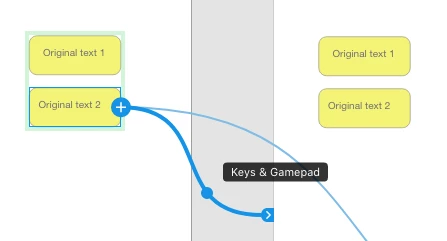
I am unable to see the pop up properties while selecting the arrows in prototype mode. I clicked on them and nothing happens (right and left click). All the properties are shown in the column on the right side.


Is there any way to change this? I am on Windows and I can't see a "View" tab where I can change this.


{Renamed By MOD}
This topic has been closed for replies.
Correct answer Peter Villevoye

I had to go back more than one year in memories, to realize that you are still used to the old method of showing those properties: double clicking the handles. So they changed that some time ago, and moved all settings to that panel on the right, Rishabh was talking about in his earlier answer.


Also note that you can have multiple triggers now to do different things from the one same starting point to a different destination. So your handles and lines show a plus sign and a number, to indicate the current trigger you're working with.


Familiarize yourself with these new featutres of Prototyping:

https://helpx.adobe.com/nl/xd/help/create-prototypes.html


3 replies

Participant
March 26, 2020

Thank you so much for your answers. There's a great support in this forum.

I didn't know they moved it to the right panel. Thanks! 🙂

Rishabh_Tiwari
Legend
March 27, 2020

Glad to hear that! Feel free to reach out if you run into any other issues or have any questions in the future. Thanks!   

Peter Villevoye
Community Expert
Peter VillevoyeCommunity ExpertCorrect answer
Community Expert
March 24, 2020

I had to go back more than one year in memories, to realize that you are still used to the old method of showing those properties: double clicking the handles. So they changed that some time ago, and moved all settings to that panel on the right, Rishabh was talking about in his earlier answer.


Also note that you can have multiple triggers now to do different things from the one same starting point to a different destination. So your handles and lines show a plus sign and a number, to indicate the current trigger you're working with.


Familiarize yourself with these new featutres of Prototyping:

https://helpx.adobe.com/nl/xd/help/create-prototypes.html


Rishabh_Tiwari
Legend
March 24, 2020

Hi there,


Thanks for reaching out. The Properties inspector is now set to the right pane. When you right-click on the arrow, you should get the below dialog box. If you are not getting this Window, I'd request if you can share your system logs by following the steps here: https://helpx.adobe.com/in/creative-cloud/kb/cc-log-collector.html

Please try re-installing the application and let us know if it works or if you need any further assistance.


Regards

Rishabh


Participant
March 26, 2020

I do! Thank you so much for your answer. I didn't know they moved it to the right panel.

Again, thanks!