Stefania | SVBK
Participant
March 17, 2020
Answered

[PANELS]- Organize assets panel objects

  • March 17, 2020
  • 1 reply
  • 326 views

Hello everybody,
I'm experiencing a problem with my Assets list in Adobe XD. Characters and components lists keep changing order.

I usually list my assets in a certain way, so I can find them immediately (i.e., all the titles, then all the paragraph styles, or headers, then footers and so on...). Sometimes, when I reopen my project, the order changed.


I know it doesn't affect my work in a severe way, but I must say it's quite annoying, especially when you have plenty of components in your list. Does anyone know why this happen?


(In the picture below you can find an example, before and after)
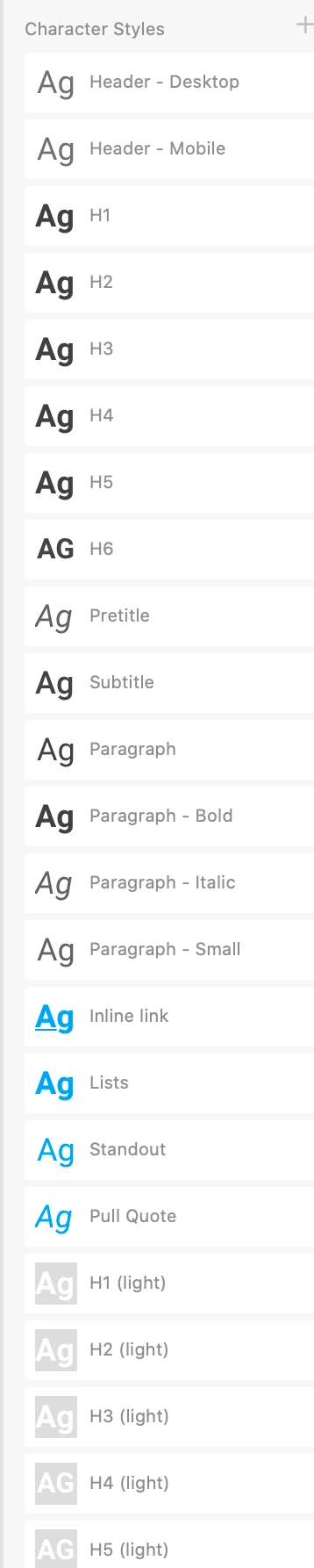


{Renamaed by MOD}

This topic has been closed for replies.
Correct answer Rishabh_Tiwari

Hi there,


Thanks for reaching out. I found a similar request raised on the Adobe XD UserVoice, I'd request, please upvote the request and share your comment here: https://adobexd.uservoice.com/forums/353007-adobe-xd-feature-requests/suggestions/33272584-create-and-organize-symbols-components-into-folder


This is the best way of communicating with the Engineering and Product Management teams regarding issues and suggestions so they can be implemented in future releases. 


Regards

Rishabh

1 reply

Rishabh_Tiwari
Rishabh_TiwariCorrect answer
Legend
March 17, 2020

Hi there,


Thanks for reaching out. I found a similar request raised on the Adobe XD UserVoice, I'd request, please upvote the request and share your comment here: https://adobexd.uservoice.com/forums/353007-adobe-xd-feature-requests/suggestions/33272584-create-and-organize-symbols-components-into-folder


This is the best way of communicating with the Engineering and Product Management teams regarding issues and suggestions so they can be implemented in future releases. 


Regards

Rishabh