
Participant
June 19, 2020
Answered

Password Protect option is missing from SharePane in XD 30 version.

  • June 19, 2020
  • 4 replies
  • 9401 views

The "password protected" option has disappeared from my Adobe Xd version 30.0.12.14


<The Title was renamed by moderator>

This topic has been closed for replies.
Correct answer Arun Kaza

Hi,

Can you confirm if you are trying to set a password on an existing link that was published from your document? Please attach a screenshot of the Share mode Properties Inspector that you see. It would help us better guide you based on your scenario.


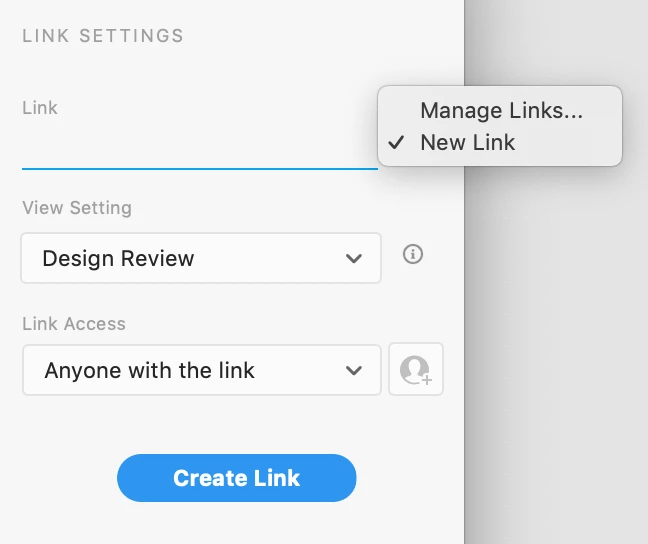
Note that if you are looking to set password on an existing link that is 'Public' or is showing the link access set as 'Anyone with the link', then you will have to create a new password link. The existing 'Public' link cannot be changed to a Password-Protected link. To create a new link, click on the "Link" drop-down and choose New Link (as shown in this screenshot)
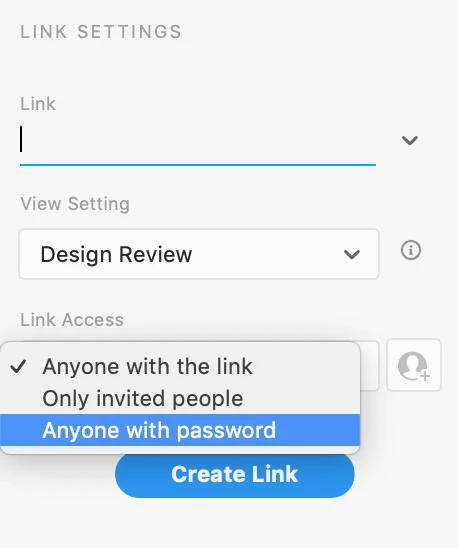
Once you choose New Link, that is when you should be able to see the option of "Anyone with password" in the 'Link Access' dropdown.
You should be able to do this from both Mac & Win platforms. Please let us know if this is not what you see?
Thanks!


4 replies

Participant
September 9, 2020

Hello there,


Sorry but I dont understand the answer and have the same problem. I cannot set a password anymore, the option is simply gone from the dropdown menu. Is it generally still possible to set a password? Or is everything working by private / public links? this seems like a complicated workaround if I have to invite every person separately in order to have some kind of protection...By the way, I am working on a Windows machine and my collegue on a Mac and for her it is still working to set a password. Is it a Mac / Win issue? Thanks for your feedback!

Arun Kaza
Adobe Employee
Arun KazaCorrect answer
Adobe Employee
September 9, 2020

Hi,

Can you confirm if you are trying to set a password on an existing link that was published from your document? Please attach a screenshot of the Share mode Properties Inspector that you see. It would help us better guide you based on your scenario.


Note that if you are looking to set password on an existing link that is 'Public' or is showing the link access set as 'Anyone with the link', then you will have to create a new password link. The existing 'Public' link cannot be changed to a Password-Protected link. To create a new link, click on the "Link" drop-down and choose New Link (as shown in this screenshot)
Once you choose New Link, that is when you should be able to see the option of "Anyone with password" in the 'Link Access' dropdown.

You should be able to do this from both Mac & Win platforms. Please let us know if this is not what you see?
Thanks!


Participant
September 9, 2020

Aaaaah that was the problem! Thank you so much. I didnt know that you cant set a password on a previously published public Link. So now it is working. Thanks for your quick response, you made my day :))))

Participant
June 25, 2020

Same issue - the password option is no longer there. This is happening on already created files where a password was in place before the latest update.

HARSHIKA_VERMA
Community Manager
Community Manager
June 26, 2020

Hi there,


Sorry to hear you are unable to see the password option in XD. It looks like you are experiencing the issue on the files created in the previous version of XD.  Also, after password links are published, you cannot change the link access setting. If you want to change the access settings, you must create a new link. Please see this article for more info: https://helpx.adobe.com/xd/help/share-designs-prototypes.html#Howdoicreatelinksforsharingadesignspecoraprototype


Hope it helps.


Thanks,

Harshika

chrishertz
Participant
July 21, 2020

I can confirm this worked. I also ensured my XD was up to date.

Soar Tech
Participant
June 23, 2020

Hello, I am also having this issue. Was this feature moved somewhere else?

HARSHIKA_VERMA
Community Manager
Community Manager
June 19, 2020

Hi there,


We are sorry to hear you are unable to see the option of password in share pane in XD. Would you mind confirming if this is a new file created in the XD 30 version? If it's an old file, could you please try creating a new link of this file and see if the option appears for you?


We will try our best to help.


Thanks,

Harshika

Mohit_Pilania
Participant
May 13, 2021

Hi Harshika,

I am working on new file with latest version(40) but password option is missing.