Participant
January 12, 2021
Question

paste board item in artboard

  • January 12, 2021
  • 1 reply
  • 533 views

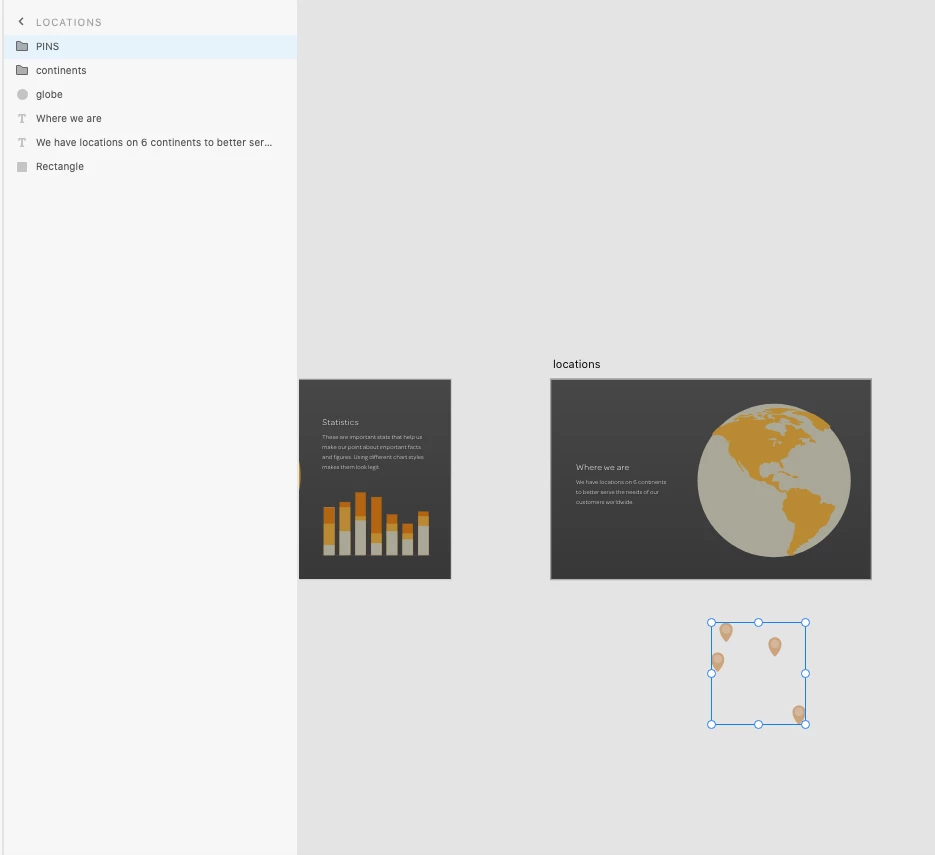
Why the item(PINS) is already on pasteboard, and yet it can still show on artboard? How to do that?

    This topic has been closed for replies.

    1 reply

    HARSHIKA_VERMA
    Community Manager
    Community Manager
    January 12, 2021

    Hi there,


    Thanks for reaching out. From what I see in the picture, it looks like everyting is located into the pasteboard and not artboard. Could you please add one artboard and then drag PINS to the artboard and see if that helps?


    Thanks,

    Harshika

    Participant
    January 13, 2021

    Hi, 


    Thanks for yoyr reply.

    But I don't get it. Let me rephrase my question. I was actually follow along the tutorial provided on adobe XD learning page.

    Hence the asset is downloaded from the website. There are several artboards, one called '' locations'', and one of the assest, which is "pins", is obviously outside the artboard, which means it should show in the pasteboard, and yet the asset "pins" show on the"locations" artboard. My question is how is that gonna happen? I try to create my own artboard and asset, and I never got the same result shown in the image.


    MengChi

    HARSHIKA_VERMA
    Community Manager
    Community Manager
    January 26, 2021

    Sorry for the delay in response, MengChi. That's strange, it looks like on the file it shows as if PINS are on pasteboard but actually they are on the artboard. When I see the layer panel, it shows that it's on the LOCATION artboard. I would suggest closing the file and restarting the machine.


    Let us know if that helps.


    Thanks,

    Harshika