
Participant
November 3, 2021
Question

*Please help me! Adobe XD is not available for my device! (Urgent)

  • November 3, 2021
  • 1 reply
  • 1019 views

I received an XD file from another person, which was created via using a free XD. When I was trying to open it, my XD said a newer XD created it, even I updated it. Therefore, I was trying to download a free edition from the Adobe website after uninstalling mines. However, once the downloading page reminded me to open my cloud from my desktop, my XD showed me this. Then, the download option of XD also disappear from my Adobe plan except for the mobile edition. Right now, I need my XD back for an extremely important presentation in two days, so I am mad and feel so helpless now. I saw another dude who also had the same situation as mine, but I never saw an answer. Anyway, I need help. HEEEEEEEEEEEEEELP!!!!!
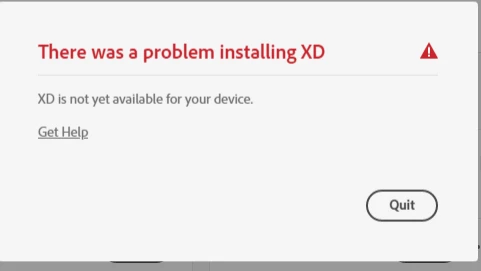
    This topic has been closed for replies.

    1 reply

    Rishabh_Tiwari
    Community Manager
    Community Manager
    November 3, 2021

    Hi there,


    Sorry to hear about the trouble. If your system meets the minimum system requirement mentioned here and still it is showing as not compatible, then please try the steps mentioned here and let us know if this helps or if you need any further assistance.


    Regards

    Rishabh

    Participant
    November 3, 2021

    Hi Rishabh,
    Thank you for your response. I tried the method you suggested, but it did not work. I am a student, and my college has bought all the Adobe services for me, and my laptop is definitely able to run the app. Hence, my issue is not about compatibility. I was still using Xd this morning. My problem is that after uninstalling my original Xd, I was trying to download a new one from Adobe's website. That was where everything started to go wrong. The Xd download option was gone from my Adobe cloud. Everything was still there except the Xd. If I try to download a new one from Adobe's website, the picture I posted will keep showing up. I still can find the mobile edition Xd from the menu, but I need the desktop edition to finish my work. I am so frustrated right now and don't know what has happened. Plz guide me out through this.


    Spas K.
    Community Expert
    Community Expert
    November 3, 2021

    You can try clearing out the whole CC installation and starting from scratch, using the steps here. Make sure to read everything thoroughly and follow the instructions. It's a local issue, and it's unlikely anyone can assist you. You'll probably just get more lists of minimum requirements 🙂 Your best bet is to make sure everything is clean and there's no leftover registry keys and parts of apps. Also make sure all your drivers and windows are up to date.


    Can you list your PC's specs here, more specifically OS version and graphics card model?


    Sometimes newer versions of Xd and other Adobe apps have different minimum requirements than the older versions. Your Xd might have not been updating due to the newer versions not being compatible with something, and when you removed it, you no longer had access to the same older version, as in CC you can only get the current and one version back. This might not be the case, but just mentioning it, as you haven't stated any of your specs or versions yet.