Answered
Point text box sizing issue
Hi
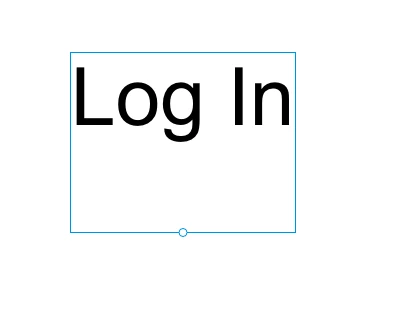
How can I get the point text box to snap to the bottom of the text?
This causes issues with alignment etc.
This issue has wasted me lots of time.

Hi
How can I get the point text box to snap to the bottom of the text?
This causes issues with alignment etc.
This issue has wasted me lots of time.
Hello,
Thankyou for reporting. You want to remove extra space that occuring in your point text ? If yes, then its happening because while typing the text , before exiting you pressed enter which cause extra blank line in bottom of text point.
To remove that, you need to go into edit mode of point text. It get highlighted with blue background, then click on extra space below the blue background and then do backspace in Win or delete in Mac. And then come out from text.
It will make point text perfectly fit in box.
I hope it would be helpful and make easier. Please reach out for further issues.
Regards,
Anita Subedi
Already have an account? Login
Enter your E-mail address. We'll send you an e-mail with instructions to reset your password.


 AdChoices