
JPRM
Known Participant
August 14, 2019
Question

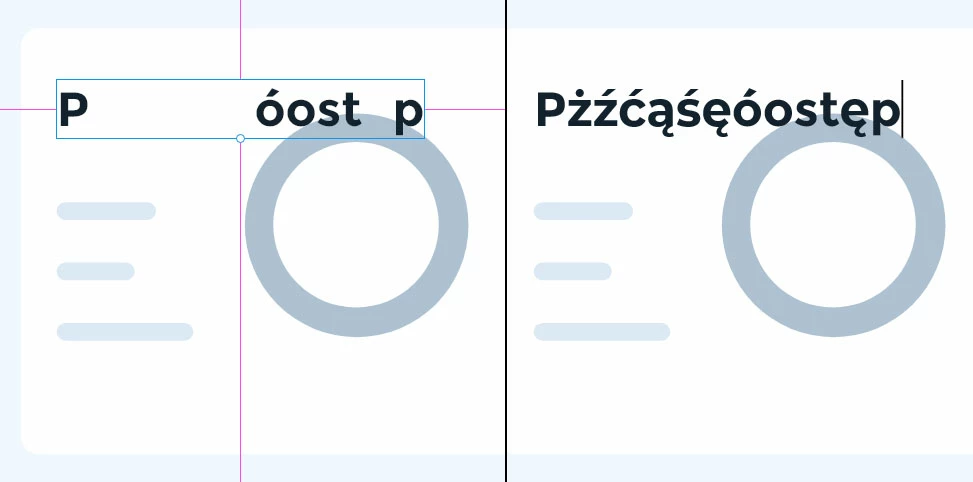
Polish letters displaying incorrectly (latin-extended)

  • August 14, 2019
  • 1 reply
  • 2623 views

Some fonts are not displaying correctly with polish alphabet. I can see them only if I select the text or if I'm in "text edit mode", but not when the text layer is selected/not selected. I have noticed this behavior recently (it used to work just fine a couple of months ago).

I can't work because of that with fonts I want to use (official fonts with latin-extended support). This is a must fix asap.

Font used  in this example - montserrat.
This topic has been closed for replies.

1 reply

Community Expert
August 14, 2019

I can type in Polish characters without issues. I'm on Mac - are you on Windows?

JPRM
JPRMAuthor
Known Participant
August 14, 2019

I can type using polish characters as well. It's just they disappear as soon as I exit "type mode" from a text layer. When I enter edit mode again, they are back, so they are there.

I'm on Windows. I've uninstalled and installed the font again - nothing changed.

What is more interesting - some of the symbols are just fine - like "ł" and "ó" - but the rest - "ęćźżśą" are not displayed.