
Inspiring
August 22, 2018
Question

Private sharing (beta) from the web

  • August 22, 2018
  • 1 reply
  • 1051 views
Latest features | Adobe XD CC

"Safely share XD prototypes and Design Specs with reviewers or stakeholders by sending an invite using your web browser the same way you do in the XD desktop application."

What's the difference between private sharing as described by Adobe above and sharing design specs without choosing the "create private link" function? Both methods provide access to design specs with the same page. Can't see any difference really. What is so private? I can password protect the one but not the other - why two sharing methods when the result is the same? One sharing method provides a web link and sends an email for the receiver to click, but the other also provides a link to the same file that I give to the recipient.


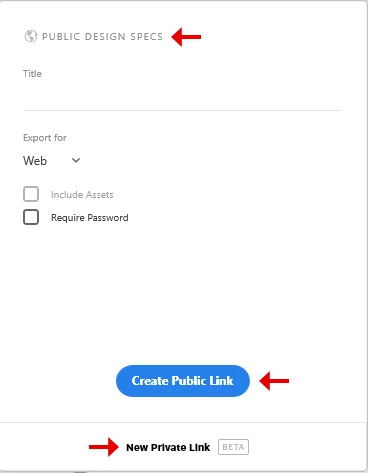
In this section we have no less than 3 different expressions:  Public Design Specs - Public Link - New Private Link. Public or Private? For the same result. Confusing. Sometimes I share Design Specs with 1 developer, other times with 12. What's the definition of private in this context? The UI seems a bit misleading?
    This topic has been closed for replies.

    1 reply

    Preran
    Community Manager
    Community Manager
    August 22, 2018

    See the section "Using Private Invites on the Web" in this doc Publish your prototype and/or design spec and share it with stakeholders by providing a public or private web link.​ that provides the required clarity around your question. Let us know if you need more info

    Thanks,

    Preran

    perrybrusAuthor
    Inspiring
    August 23, 2018

    This only confirms what I'm stating. It's no difference between the functions except from private share generates an email push. I still don't get why Adobe does such a noisy sharing section with no less that THREE expressions on this. Private or not private is the same cause you can add password protection to the shares that are not private links.

    I checked the private link function by sharing it with myself on a different LAN, when I opened that email invite I was denied access. So it doesn't work that well obviously. Anyways, totally confusing this whole pattern. In my world you either share it or you don't. Creating these different expressions for what provides really identical outcomes is bloating. If you wanna keep the shares restricted to the people you share it with then add password protection, then the word "private" won't be factual or required at all. Would remove confusion.

    Participant
    August 24, 2018

    Hi perrybrus, thanks for sharing your feedback with us. We are working on making the workflow and the UX more clear to our users to address such confusion.

    The key difference between password protected links and private links is that the invited person would need an Adobe ID to be able to view the private link while anyone with the password can view the password protected links without signing up or signing with Adobe ID.

    Requiring reviewers to sign in adds more security and control around who can view your design, and some organizations require such added security.

    If your workflow simply requires a password to share, please keep using the sharing method that fits your needs.

    Thanks,

    Kate