
frauenauge
Inspiring
August 30, 2021
Answered

Problems export asset with text as svg

  • August 30, 2021
  • 2 replies
  • 2159 views

Hi there ;))

I have to export an asset as svg and are having problems with the position of the text - it doesn't stay in the correct position. If anyone knows, what could be the problem, I'll be glad for your support. :))

1. screenshot in XD

2. after svg export


Thanks 🌿
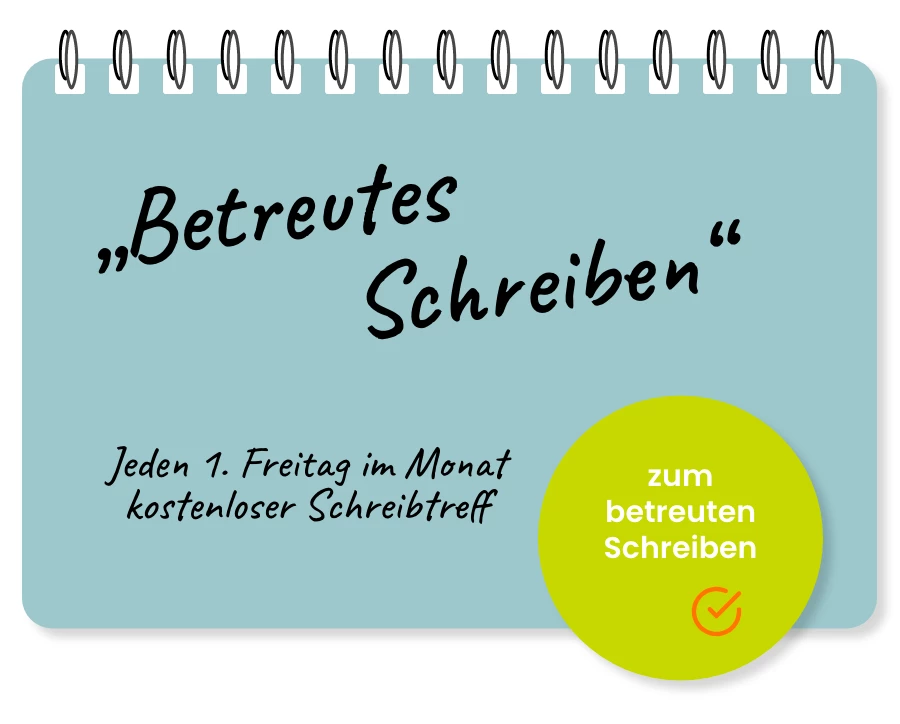
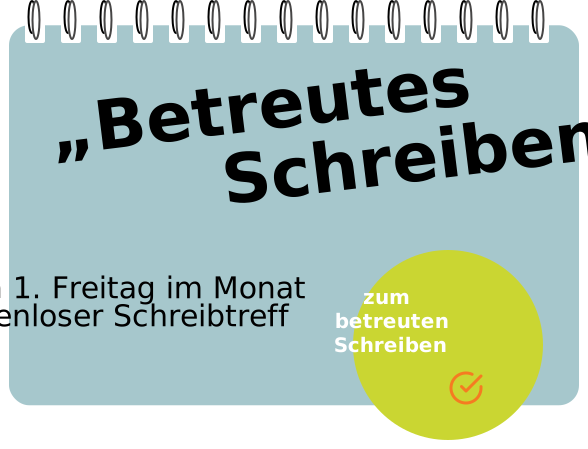
 

    Correct answer Spas K.

    You can try converting the text to a path (Object > Path > Convert to Path). Text in SVGs is rendered differently by different browsers and situations and is best avoided. You will also have to make the fonts used available on the web page and use web-safe fonts.


    If it's important for it to stay as text, you can recreate it with html/css for the best / safest result.

    2 replies

    Spas K.
    Community Expert
    Spas K.Community ExpertCorrect answer
    Community Expert
    September 1, 2021

    You can try converting the text to a path (Object > Path > Convert to Path). Text in SVGs is rendered differently by different browsers and situations and is best avoided. You will also have to make the fonts used available on the web page and use web-safe fonts.


    If it's important for it to stay as text, you can recreate it with html/css for the best / safest result.

    frauenauge
    Inspiring
    September 1, 2021

    Cool, thank you @Spas K. ,

    it works perfectly now, if I convert text into path! 😃On the web-page I will of course try to work mostly with real text and just use the (blue) background with the spirals. 

    What I don't understand is, why was the big headline not offset, only the smaller fonts ... 🤓...


    Spas K.
    Community Expert
    Community Expert
    September 1, 2021

    Could be a number of things. Might have something to do with how the layers are grouped, both of those smaller texts seem to be offset by the same amount. Not sure how Xd interprets the layer hierarchy when exporting SVGs.

    Known Participant
    August 31, 2021

    Hi,

    Sorry for the off topic, but can you open the SVG you exported from XD in Photoshop or Illustrator? Also, does it work when you use it in the HTML/CSS files?

    frauenauge
    Inspiring
    August 31, 2021

    Hi Chris, yes, I can open it, but there is a warning: "Zuschneidung geht beim Export ins SVG Tiny-Format verloren" (Clipping is lost when exporting to SVG Tiny format).

    And the text is displayed offset like in my screenshot. Could it possibly be because I used a drop shadow?

    best regards 😉

    frauenauge
    Inspiring
    August 31, 2021

    P.S. I can open it in Illustrator and with a browser, e.g. Firefox ...