


Participant
August 10, 2020
Answered

Prototype - clicking anywhere goes back to previous screen

  • August 10, 2020
  • 3 replies
  • 1912 views

Hi - I am new to Xd. I have made a protoype, and am in the middle of testing it. Testers are getting frustrated because the whole app screen appears to be hotlinked to the previous screen if they don't click on an actual assigned hotlink area. What am I doing wrong or how do I stop this? It is causing all kinds of confusion.... - Many thanks, Andrea
    This topic has been closed for replies.
    Correct answer Vertika Gupta

    Hi There,

    Thank you for sharing screenshot. 

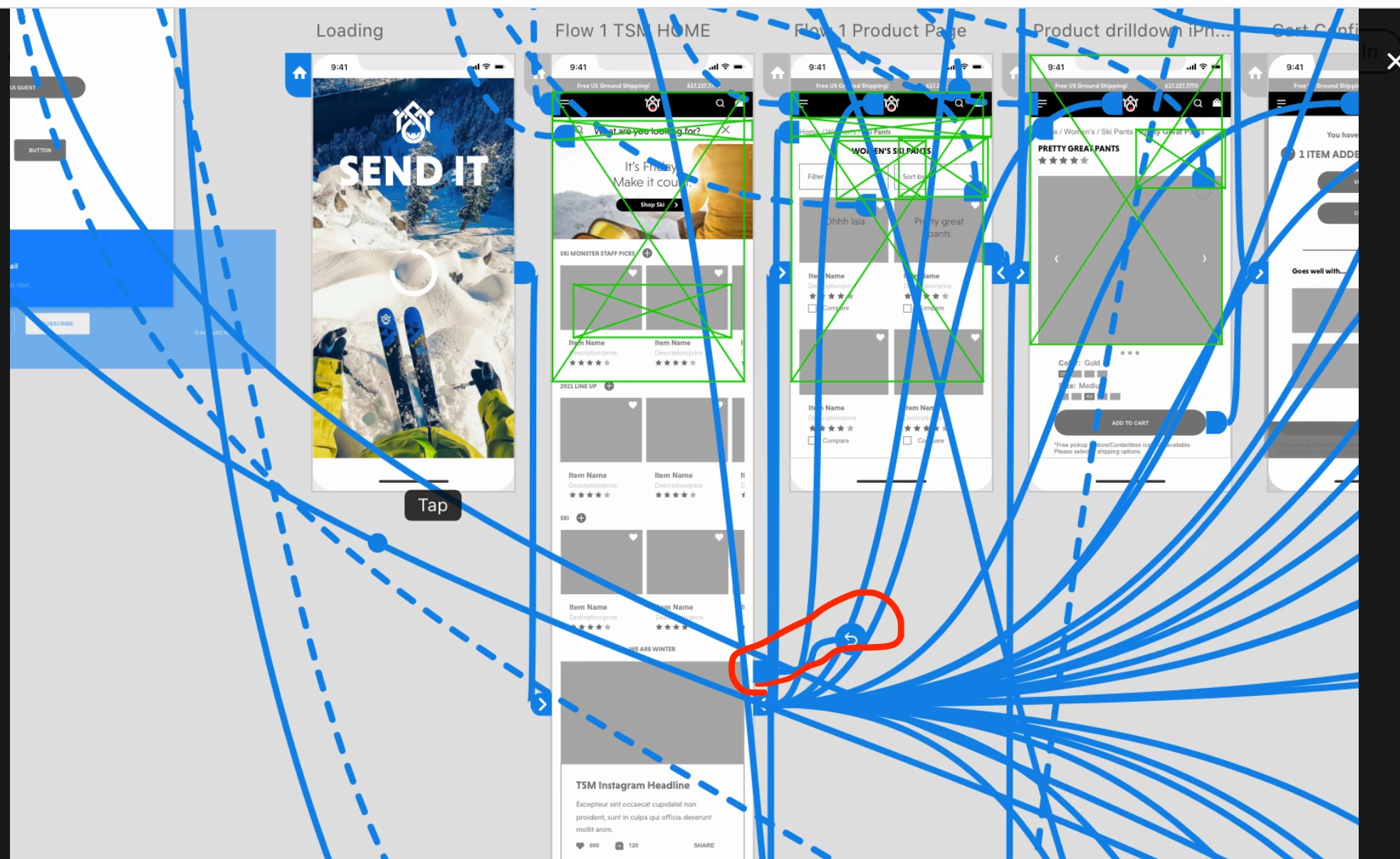
    Please remove the previous screen wiring, which is taking to previous artboard.

    Please have a look on screenshot.

    Hope it will help.


    Thanks,

    Vertika Gupta

    Adobe XD

    3 replies

    Vertika GuptaCommunity ManagerCorrect answer
    Community Manager
    August 11, 2020

    Hi There,

    Thank you for sharing screenshot. 

    Please remove the previous screen wiring, which is taking to previous artboard.

    Please have a look on screenshot.

    Hope it will help.


    Thanks,

    Vertika Gupta

    Adobe XD

    Participant
    August 11, 2020

    Thank you so much! That appears to have fixed the problem. It was driving me crazy!

    Community Manager
    August 11, 2020

    Welcome.

    Happy Designing!!


    -Vertika Gupta


    HARSHIKA_VERMA
    Community Manager
    Community Manager
    August 10, 2020

    Hi there,


    Welcome to the Adobe XD Community!


    Thanks for using Adobe XD. I am not quite of sure the kind of interactions you made in your prototype. I would suggest checking this article: https://helpx.adobe.com/in/xd/help/create-prototypes.html#wire-up on how to link the artboard.


    If that doesn't help, please share the screenshot of all the interactions in prototype mode. Once you select everything on the canvas in prototype mode it will show all the interactions.


    I will try my best to help.


    Thanks,

    Harshika

    Participant
    August 10, 2020

    Thank you Harshika for the reply. I will share a screen shot. The easiest example: tallest screen - "TSM Home" always hotlinks back to "Loading" screen, no matter where you click (unless on a hotlink).

    Participant
    August 10, 2020

    I have checked and double checked there isn't some kind of hidden interaction deep withinin the components/layers, but I am not finding anything. I feel like I am missing something!