
Participant
November 24, 2022
Answered

Prototype comments not visible

  • November 24, 2022
  • 2 replies
  • 624 views

On my xd prototype, I can not access comments made on a shared link. I get the email notification and do see the pin, but my side panel for comments is empty. 


I did the restarting, updating, changing the shared link options, clearing cache, and cookies. Nothing helps.


I cannot move forward with my project without seeing my client's comments.


I see this issue brought up on this forum as early as 2018, and many times later. It is uncanny that it was not fixed throughout this time. I even do not know to where migrate with my work as adobe now owns Figma and will ruin it in a matter of few years for sure...
    This topic has been closed for replies.
    Correct answer HARSHIKA_VERMA

    Hi @Baltazar238175438v7n,


    Thank you for reaching out. In addition to what is suggested by our expert, please 

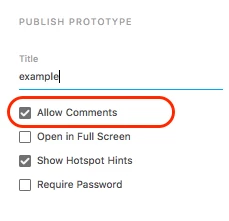
    try unchecking and checking "Allow Comments" in the popup dialog when you share the prototype.


    Let us know if that helps.


    Thanks,

    Harshika


    2 replies

    HARSHIKA_VERMA
    Community Manager
    HARSHIKA_VERMACommunity ManagerCorrect answer
    Community Manager
    November 25, 2022

    Hi @Baltazar238175438v7n,


    Thank you for reaching out. In addition to what is suggested by our expert, please 

    try unchecking and checking "Allow Comments" in the popup dialog when you share the prototype.


    Let us know if that helps.


    Thanks,

    Harshika


    HARSHIKA_VERMA
    Community Manager
    Community Manager
    November 28, 2022

    Hi @Baltazar238175438v7n,


    Hope you're doing well!


    We would like to follow up on your issue. Are you able to resolve the issue by following our expert advice? Please feel free to update the discussion if you need further assistance.


    We would be happy to help.


    Thanks,

    Harshika

    Spas K.
    Community Expert
    Community Expert
    November 25, 2022

    Did you try a different browser? Did you try opening it in incognito mode without any extensions / plugins? Some of them might be causing an issue.