

dav1d_korn
Participant
December 21, 2019
Answered

Prototype: remove return wire
  • December 21, 2019
  • 1 reply
  • 1768 views

Hello world,

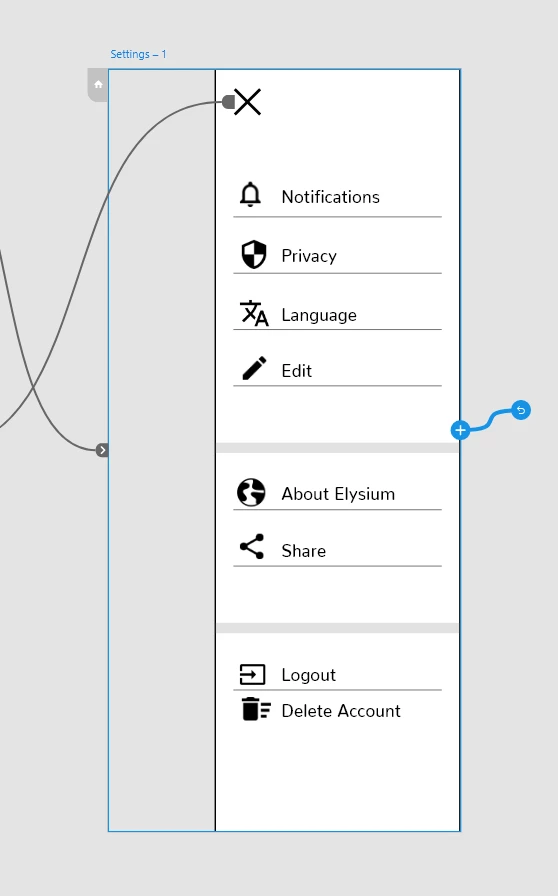
my problem is that I don't know how to delete the return wire in prototype mode. Now every time I click anywhere on the screen (in preview) it jumps right back to the previous page. But I would like that when I click on the screen in preview mode it doesn't jump back. Is there a possibility to delete these "return wires" or solve this problem otherwise.


Thanks in advance  

David

This topic has been closed for replies.
Correct answer Peter Villevoye

Yes, and it's very simple: the Delete key.

With the new feature of having multiple outgoing wires (for multiple triggers) the team had to rethink and revise the method of deleting wires. But now the paradigm doens't offer an option anymore to remove wires without using the keyboard ! Hopefully this gets a fix in the next update...

1 reply

Peter Villevoye
Community Expert
Peter VillevoyeCommunity ExpertCorrect answer
Community Expert
December 21, 2019

Yes, and it's very simple: the Delete key.

With the new feature of having multiple outgoing wires (for multiple triggers) the team had to rethink and revise the method of deleting wires. But now the paradigm doens't offer an option anymore to remove wires without using the keyboard ! Hopefully this gets a fix in the next update...

beckiehawk
Participant
January 7, 2020

Thank you!!!!!  I've been trying to figure out how to remove a wire for a couple of hours now!