Participant
March 11, 2021
Answered

Prototype screen hanging half way through presentation

  • March 11, 2021
  • 3 replies
  • 587 views

I'm a complete beginner to Adobe XD but have been working on a project to design an airline booking journey for a course. I am ready to submit this project however when I create the share link and open it in a browser it only lets me so far through the journey and then it hangs up - always on the same screen, I have tried deleting and re-linking all the connections. I've also tried deleting the shared link and creating a new one (many times in various modes). I'm completely at a loss and would massively appreciate any guidance on where I'm going wrong if possible.  Thank you very much!

https://xd.adobe.com/view/49543b38-cd8c-43fb-8dbe-da4184b5fdc7-1c07/?fullscreen



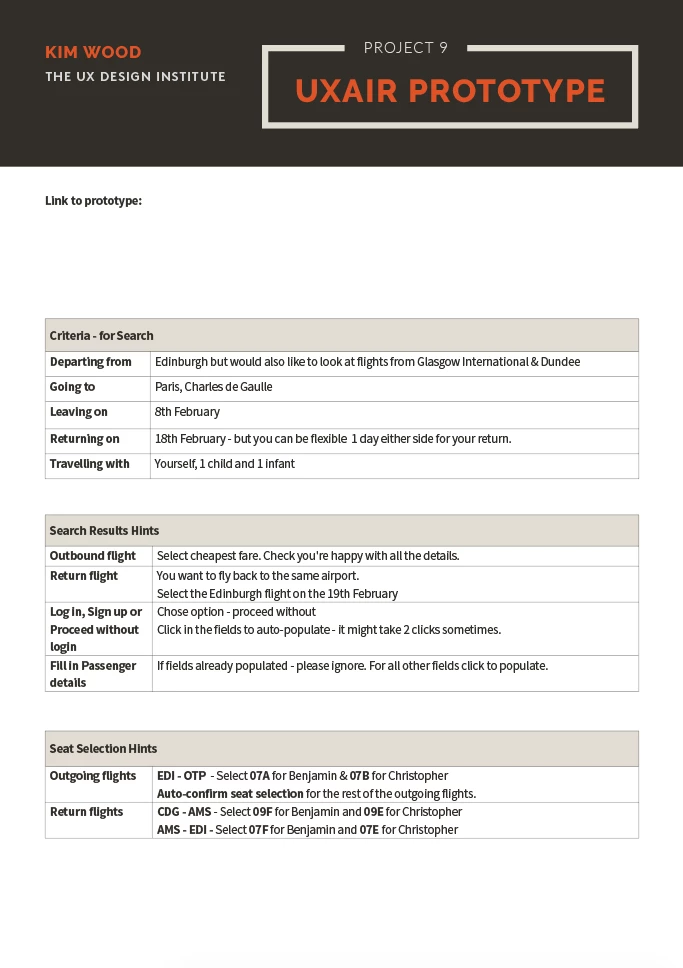
Here is also a screenshot of where it hangs up and a guide to the journey the prototype was created for.

 

    This topic has been closed for replies.
    Correct answer Rishabh_Tiwari

    Hi there,


    Sorry to hear about the trouble. I see that you have an older version of XD, so would you mind updating XD to the latest version which is 37.1 and updates the link once XD has been updated. For information on how to update XD, please refer to this article: https://helpx.adobe.com/creative-cloud/help/creative-cloud-updates.html


    Let us know if that helps or if you need any further assistance.


    Regards

    Rishabh

    3 replies

    Harshika Verma
    Community Manager
    Community Manager
    April 5, 2021

    Hi Edward, 


    It's been a while we haven't heard back from you. Is your issue is resolved? Could you please try a different browser and see if that works?


    Please feel free to update the discussion if you need further assistance from us.


    We would be happy to help.


    Thanks,

    Harshika

    Spas K.
    Community Expert
    Community Expert
    March 14, 2021

    It doesn't hang for me, maybe you fixed it? Was the problem just for you or did you test the prototype on another computer / browser? It could be a cache related issue, or just some component loading very slowly.

    Rishabh_Tiwari
    Rishabh_TiwariCorrect answer
    Legend
    March 11, 2021

    Hi there,


    Sorry to hear about the trouble. I see that you have an older version of XD, so would you mind updating XD to the latest version which is 37.1 and updates the link once XD has been updated. For information on how to update XD, please refer to this article: https://helpx.adobe.com/creative-cloud/help/creative-cloud-updates.html


    Let us know if that helps or if you need any further assistance.


    Regards

    Rishabh