


Participant
June 29, 2020
Answered

Replacing missing fonts causing touble saving the file and closing XD
  • June 29, 2020
  • 1 reply
  • 390 views


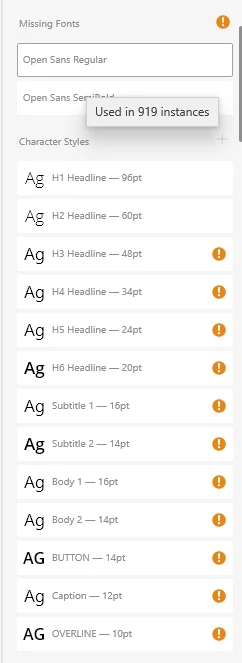
I have two missing fonts that I want to replace. When I hit replace (with the same font, because I don't want to change the font..) Adobe XD will stop saving the file and I cannot close it anymore but I can further work (but this work cannot be saved anymore..) 


What should I do to dismiss the "Missing Font" notification instead? 

    This topic has been closed for replies.
    Correct answer MatthiasU17490658

    Signing in and out didn't work. I installed the missing fonts manually on my pc (instead of activating it only as CC Fonts). After that I was able to replace the font. But thanks for the help! 

    1 reply

    Harshika Verma
    Community Manager
    Community Manager
    July 1, 2020

    Hi there,


    We are sorry to hear you're getting error missing fonts while using XD. We would request you to please try signing out of Creative Cloud app and XD and sign back in and see if that helps.


    If that doesn't help, please try the solution suggested in this post: https://community.adobe.com/t5/adobe-xd/fonts-missing-in-xd/td-p/9654598?page=1


    Let us know if that helps.


    Thanks,

    Harshika

    MatthiasU17490658AuthorCorrect answer
    Participant
    July 3, 2020

    Signing in and out didn't work. I installed the missing fonts manually on my pc (instead of activating it only as CC Fonts). After that I was able to replace the font. But thanks for the help! 

    Harshika Verma
    Community Manager
    Community Manager
    July 8, 2020

    Glad to hear you are able to resolve the issue and thanks for sharing the solution that worked for you. Please feel free to reach out to us in the future for any query related to XD.


    We would be happy to help.


    Thanks,

    Harshika