

sarahpeller
Known Participant
September 1, 2022
Answered

Resizing in XD? Why is this so hard?

  • September 1, 2022
  • 1 reply
  • 2836 views

I must be missing something obvious here because this seems strangely hard to achieve what I want... I'm really new to XD, but have many years of PS, AI & ID experience.


I created a group, then a component in XD. It's attached here. I made these components a little too large on the page, and I want to them all to be smaller. So, I select the component or components and try to resize. But when resizing, it seems to be using responsive resize and I end up with a jumbled mess (attached) instead of the entire component or group just getting resized as it does in Photoshop, for instance.


What am I doing wrong? How do I turn off responsive resize and resize as I'd like to?


    This topic has been closed for replies.
    Correct answer Dan Rodney

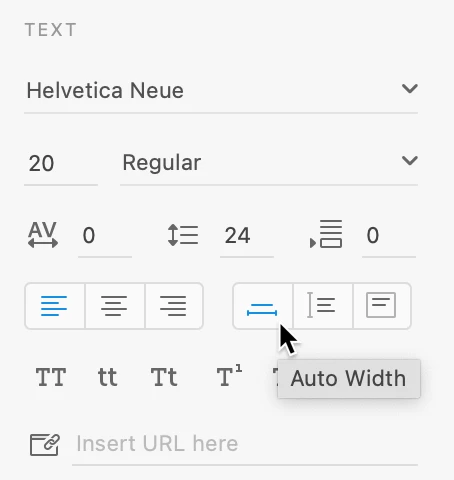
    I think you're making Fixed Size text boxes rather than the Auto Width text boxes you want. For single lines of text, click when making text, DO NOT drag. Dragging creates a fixed size text box, clicking creates an Auto Width. Fixed Size cannot be scale, but Auto Width can!


    To change a text frame after you've made it, click here:


    If you'd like to see Fixed Size text be able to be scaled, there's a feature request for that. Scale text area – Adobe XD Feedback : Feature Requests & Bugs 

    1 reply

    AkinGn
    Community Expert
    Community Expert
    September 1, 2022

    Hi @sarahpeller, you can find a toggle switch on the right sidebar, under the "Layout" section to toggle responsive resize (as seen in this video https://youtu.be/Nxi2kBF7uiQ?t=48 ) Hope this helps!

    sarahpeller
    Known Participant
    September 12, 2022

    Thank you, but Responsive Resize seems to be turned off and the button is also greyed out. I have watched this video and still can't figure this out...

    Dan Rodney
    Community Expert
    Community Expert
    September 12, 2022

    You have to turn Responsive Resize off on the main component. That's an instance you have selected. It looks like it's still on for the main compenent that this instance is based on.

    — Adobe Certified Expert & Instructor at Noble Desktop | Web Developer, Designer, InDesign Scriptor