
Participant
August 19, 2020
Answered

Responsive resize hides a repeat grid

  • August 19, 2020
  • 1 reply
  • 773 views

Doing a tutorial and all well until I copied the artboard to make responsive adjustments. As seen in this screencast, when I drag the right side of the artboard in everything behaves as expected except that repeat grid element on the bottom half of the screen hides:


https://www.screencast.com/t/OvYHbX7sFIs

any help would be appreciated.


Thanks!
    This topic has been closed for replies.
    Correct answer Spas K.

    Hi Rex. The issue is that your grid is being resized responsively, and it crops the elements within it.

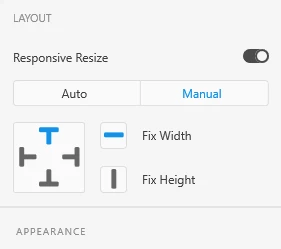
    With the grid selected, on the right side, where it says "Responsive resize", click on "Manual", and make sure you have activated the "Fix Width", and disabled the fix left and right positioning, like this:


    Sometimes Xd doesn't "guess" right what the responsive behavior should be, so you have to help it 🙂


    1 reply

    Harshika Verma
    Community Manager
    Community Manager
    August 19, 2020

    Hi there,


    Thank you for reaching out and using Adobe XD and sharing the video. It looks like inside repeat grid you are using horizontal and vertical scroll for the images. Is it possible for you to share the screenshot of the right side property inspector so that we can check the properties of repeat grid?


    We will try our best to help.


    Thanks,

    Harshika

    Rex5ECEAuthor
    Participant
    August 19, 2020

    Thanks! Here's a screenshot with the property inspector shown - https://www.screencast.com/t/lW9ni1Vs0


    The adjustments you also see in the 2nd artboard were made after my original post in an attempt to fix the issue but have not worked.

    Thanks,

    Rex

    Spas K.
    Community Expert
    Spas K.Community ExpertCorrect answer
    Community Expert
    August 20, 2020

    Hi Rex. The issue is that your grid is being resized responsively, and it crops the elements within it.

    With the grid selected, on the right side, where it says "Responsive resize", click on "Manual", and make sure you have activated the "Fix Width", and disabled the fix left and right positioning, like this:


    Sometimes Xd doesn't "guess" right what the responsive behavior should be, so you have to help it 🙂