


Participant
Mar 3, 2021 3:29 PM UTC
Question

Scaling Proportionately in XD

Howdy, Adobe XD Community! 


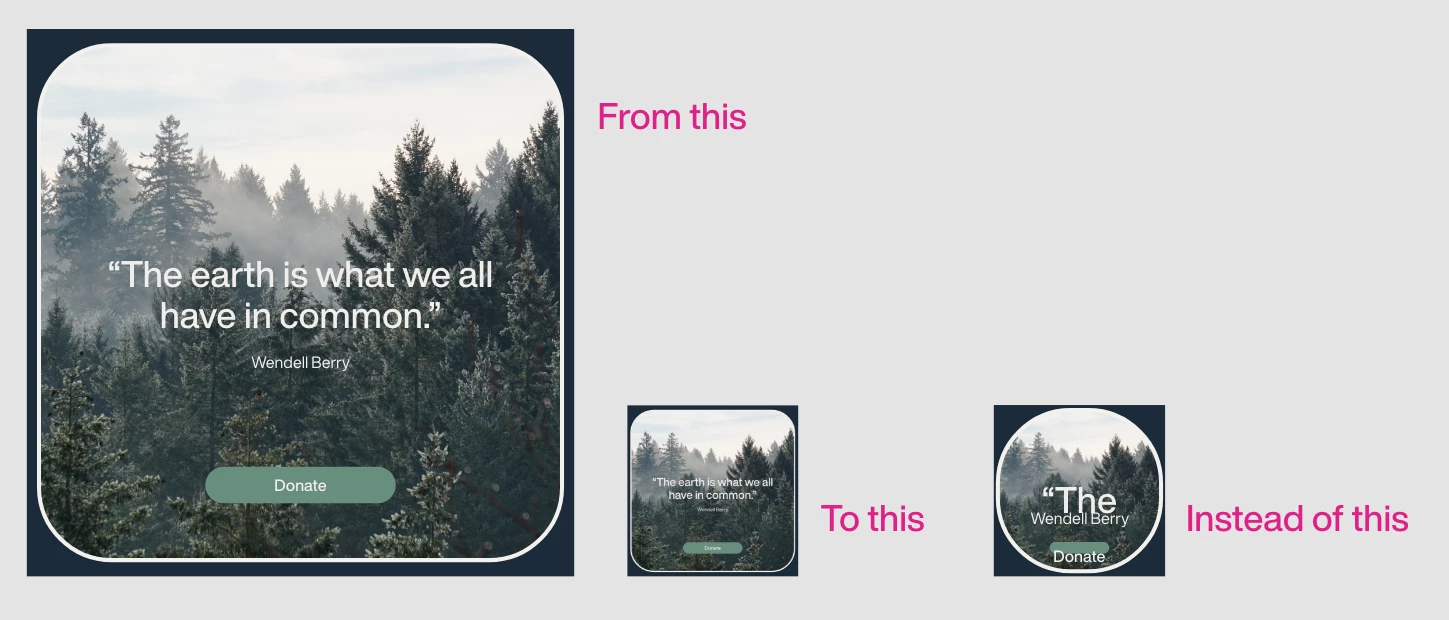
I'm working in XD and would like to scale a component proportionately. Is this possible? I can't figure it out. The corner radius remains live, as does the text. Example below. Also, I'm happy to simply be directed to other threads if you know of any, I just didn't have any luck searching, perhaps due to not exactly knowing what to search. 

Running 37.1.32 on  Big Sur 11.2.1

Thanks in advance. 
 

This topic is closed to new replies. Start a new post to keep the conversation going.

8 replies

Community Manager
Mar 4, 2021 5:05 AM UTC

Hello kenneth,


While resizing make sure Shift key is pressed ( it will lock the aspect ratio between width and height ) and responsive resize of component should be off for better result.

I hope it would be helpful.


Regards,

Anita Subedi

Translate
Participant
Mar 4, 2021 1:05 PM UTC

Thanks, @Ansubedi03.

I do hold the Shift key for locking the aspect ratio. While this does make sure my proportions are locked, it doesn't do anything for the corner radii or the text size.  

Turning off Responsive Resize did not change anything for me. 

Translate
Ares Hovhannesyan
Community Expert
Community Expert
Mar 4, 2021 2:24 PM UTC

Adobe xd needs a feature to Scale Corners radius value when the whole object has been scaled. Such a future have Adobe Illustrator. So you need to rescale corner radius back to initial value manually by hand changing corner radius from property panel or by usung scaling point on the object

Translate