Participant
Jan 21, 2021 9:06 AM UTC
Answered

Search specific published links

A couple of months ago, I supplied an XD prototype link to a colleague, but the password I supplied along with the link now doesn't seem to work. Is there any way to search my published links for the specific url so I can go into the file and update the password/re-supply the link?

    This topic is closed to new replies. Start a new post to keep the conversation going.
    Harshika Verma
    Harshika VermaCorrect answer
    Community Manager
    Jan 27, 2021 11:22 PM UTC

    Hi Clairee,


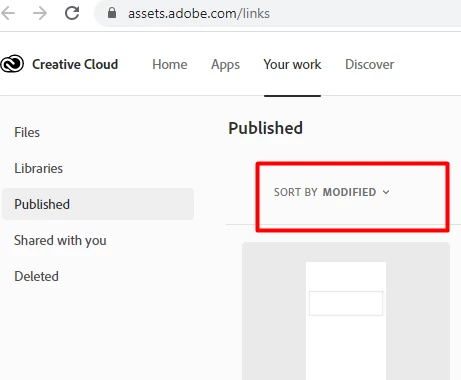
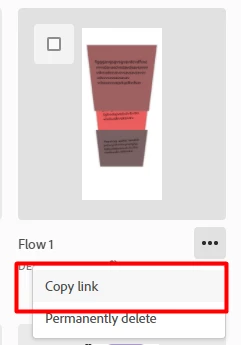
    I am not sure if there is a way to search by link instead of the file name. I will check with the team. However, If you open the link shared above by Rishabh. It will show up all your files and when you click on the 3 dots. You will see the "Copy Link" option. Once you copy the link, you will get the URL of your file, and then you can match the URL with the link you are trying to search. I know it's a bit tedious task. One more thing you can try, if you have recently modified or made updates to the file you are searching then you can also filter that out using the option shown below-


    Hope it helps.


    Thanks, 

    Harshika

    3 replies

    Rishabh_Tiwari
    Legend
    Jan 21, 2021 5:56 PM UTC

    Hi Claire,


    Thanks for reaching out. You can search the link by file name here: https://assets.adobe.com/links


    Let us know if this helps or if you need any further assistance.


    Regards

    Rishabh

    Translate
    Participant
    Jan 27, 2021 8:59 AM UTC

    That's the problem though - I know the link, but not the file name. Is there any way to reverse the search?

    Translate
    Harshika Verma
    Community Manager
    Harshika VermaCommunity ManagerCorrect answer
    Community Manager
    Jan 27, 2021 11:22 PM UTC

    Hi Clairee,


    I am not sure if there is a way to search by link instead of the file name. I will check with the team. However, If you open the link shared above by Rishabh. It will show up all your files and when you click on the 3 dots. You will see the "Copy Link" option. Once you copy the link, you will get the URL of your file, and then you can match the URL with the link you are trying to search. I know it's a bit tedious task. One more thing you can try, if you have recently modified or made updates to the file you are searching then you can also filter that out using the option shown below-


    Hope it helps.


    Thanks, 

    Harshika

    Translate