
Participant
October 7, 2022
Answered

Secondary pop-up in Main pop-up modal

  • October 7, 2022
  • 1 reply
  • 732 views

Hi!

I have been cracking my brain for a few days now. I hope someone here can help me out!

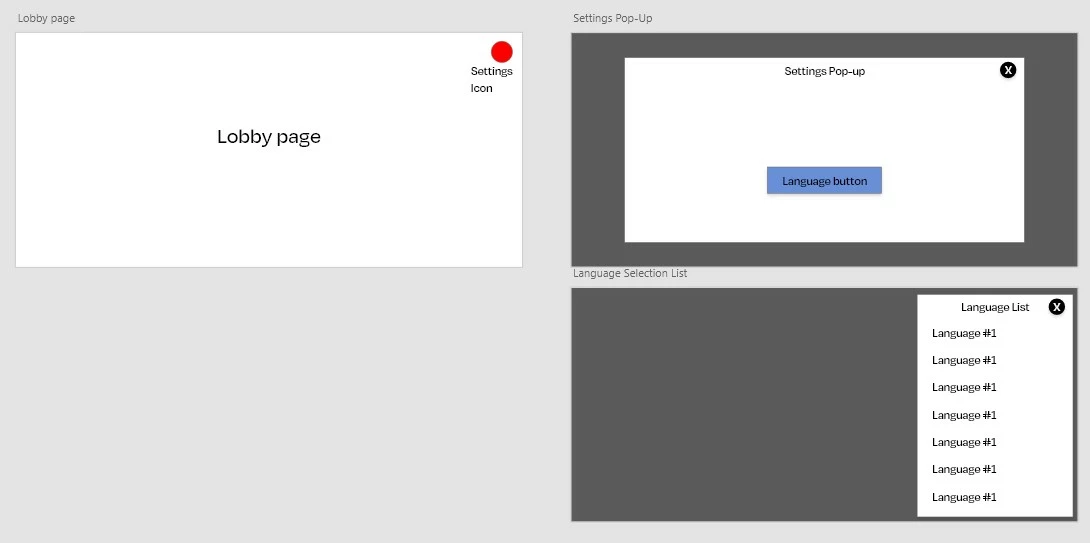
I have created a lobby page. In it a settings icon. Clicking on the settings icon will open up the settings pop-up modal. I used an overlay type for the settings pop-up.


Now in the settings pop-up, I have a language button. Clicking on the language button will slide the language pop-up from the side. 


Here's what happens when the language pop-up slides... The settings pop-up vanishes from the background and instead the lobby page is getting displayed. Why is that? The settings pop-up is supposed to be displayed in the background instead of the lobby page, right?


I have tried linking the language button in the settings pop-up to the language pop-up with overlay type, transition type, and Auto-Animate type. None of them seems to work.  


I have attached a screenshot. 
    This topic has been closed for replies.
    Correct answer AkinGn

    Hi @InfocomS, I couldn't find a way of creating "popup in a popup" (I'm not going to get into the UX side of things and say "even box in a box is not recommended in UI/UX Design, let alone a popup in a popup or something 😅) but thinking how I'd resolve the issue, I'd make the first/Settings popup a component which has a slide-in toggle menu. That way after opening the settings popup, user could be able to click a languages button/interactive element and trigger the languages toggle menu. You can see the prototype here: https://xd.adobe.com/view/1413e9f3-8544-445c-8e89-a8fdb69e6882-4140/

    And the file here: https://www.dropbox.com/s/hmts19hbho6xagu/popup-test.xd?dl=0

    Hope this helps!

    1 reply

    AkinGn
    Community Expert
    AkinGnCommunity ExpertCorrect answer
    Community Expert
    October 7, 2022

    Hi @InfocomS, I couldn't find a way of creating "popup in a popup" (I'm not going to get into the UX side of things and say "even box in a box is not recommended in UI/UX Design, let alone a popup in a popup or something 😅) but thinking how I'd resolve the issue, I'd make the first/Settings popup a component which has a slide-in toggle menu. That way after opening the settings popup, user could be able to click a languages button/interactive element and trigger the languages toggle menu. You can see the prototype here: https://xd.adobe.com/view/1413e9f3-8544-445c-8e89-a8fdb69e6882-4140/

    And the file here: https://www.dropbox.com/s/hmts19hbho6xagu/popup-test.xd?dl=0

    Hope this helps!

    InfocomSAuthor
    Participant
    October 8, 2022

    @AkinGn Thanks a lot! It works... Just what I'm looking for

    The UX I'm creating is for a game... Usually, in games, you will find a pop-up over a pop-up. 

    But again, thanks for helping me out!


    AkinGn
    Community Expert
    Community Expert
    October 8, 2022

    @InfocomS oh I only play casual games (and it's not frequently 😅) for a long time, and especially in mobile categories that's not the case but I understand, thanks for the info, and tried some game UI design in that category for personal projects, can be fun, cheers!