

Sdalexander
Participant
October 2, 2020
Answered

Send Backward/Bring Forward Buttons not working

  • October 2, 2020
  • 5 replies
  • 10294 views

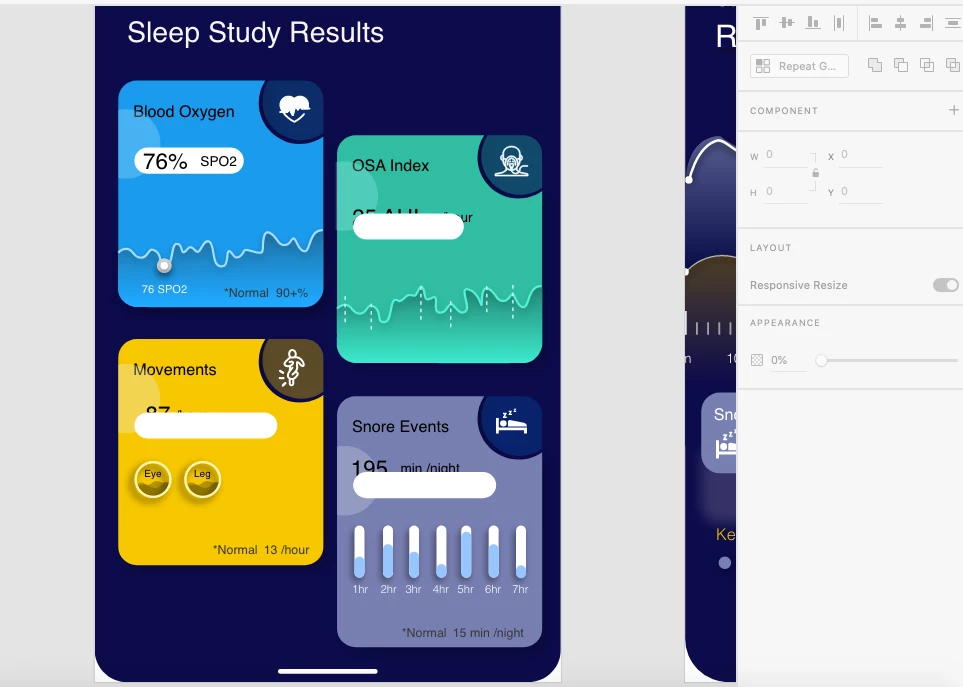
I am working on a wireframe and am having an issue with bringing some text in front of a bubble on a card. It worked on one card on the same screen, but I can't get the text to be in front on the other cards. I'm a beginner with XD and cannot figure out why this issue is occurring. In general using XD I've noticed that the Send Backward/Bring Forward buttons are not reliable most of the time. I usally have to make it work with Bring to Front or Send to Back, but in this case, even those buttons aren't working.
Correct answer HumanMac

Had this problem today and found a fix. I couldn't sucessfully bring text to front nor forward, and sending other objects to back did not solve it. I noticed that when I selected the Text icon, it changed my whole layers view, not showing any recent layers I had created. So I (1) clicked back on my artboard onto something I had recently created to get it to show again in my layers view. Then I (2) duplicated a text field from one of those new layers that hadn't been showing up when I tried to add new text - I did this in the layers view. I then (3) dragged it out of the group it had been in, to the top of my layers view. Then, I (4) clicked the new text on the artboard and hit bring to front, and it worked - it now shows.

5 replies

RonMD
Participating Frequently
August 16, 2022

I still have this problem also but only with 3D transformed objects


Participant
August 4, 2023

Same Here, But here's how I resolved. 
1) I Exported the 3D transformed compenent to a SVG file
2) I then copy pasted the SVG file back to the artboard. And now I was able to send back/forward the component.
NOTE: Take a back up/duplicate of the 3D transformed object out side the artboard. So that incase you need to make any changes to the source object.

Participant
March 11, 2021

I had this happen and I put the offending objects in a mask. I was then able to send the masked "group" to the back with no problem.

Participant
December 8, 2021

Thank you! this actually worked for me too. So this is common bug?

HumanMac
HumanMacCorrect answer
Participant
January 20, 2021

Had this problem today and found a fix. I couldn't sucessfully bring text to front nor forward, and sending other objects to back did not solve it. I noticed that when I selected the Text icon, it changed my whole layers view, not showing any recent layers I had created. So I (1) clicked back on my artboard onto something I had recently created to get it to show again in my layers view. Then I (2) duplicated a text field from one of those new layers that hadn't been showing up when I tried to add new text - I did this in the layers view. I then (3) dragged it out of the group it had been in, to the top of my layers view. Then, I (4) clicked the new text on the artboard and hit bring to front, and it worked - it now shows.

Participant
January 17, 2021

Strange I am having the same issue .. send backward not working only send back working .. 


If I have more than 2 layers and when I try to play with send backward option its not changing anything .. 


seems like a bug

Ares Hovhannesyan
Community Expert
Community Expert
October 3, 2020

Can you share yout file? If not try to use layers for arranging by dragging layers. Configuration of layers can help you to understand the stack of your object and drag to correct position. I am not shure but may be you have clipping masks or some complex master components

Sdalexander
Participant
October 9, 2020

I downloaded this template from UpLabs. https://www.uplabs.com/posts/data-analytics-health-report-statistics-mobile-app-design 

So the original designer might have put layers in, but I'm not sure how to check for those or clipping masks.