
Known Participant
October 29, 2019
Question

Services menu pops up when editing text (macOS Catalina)

  • October 29, 2019
  • 2 replies
  • 622 views

Very often when I select and/or edit the text in Adobe XD, I get this services menu popping out on the screen when I left-click on the text:
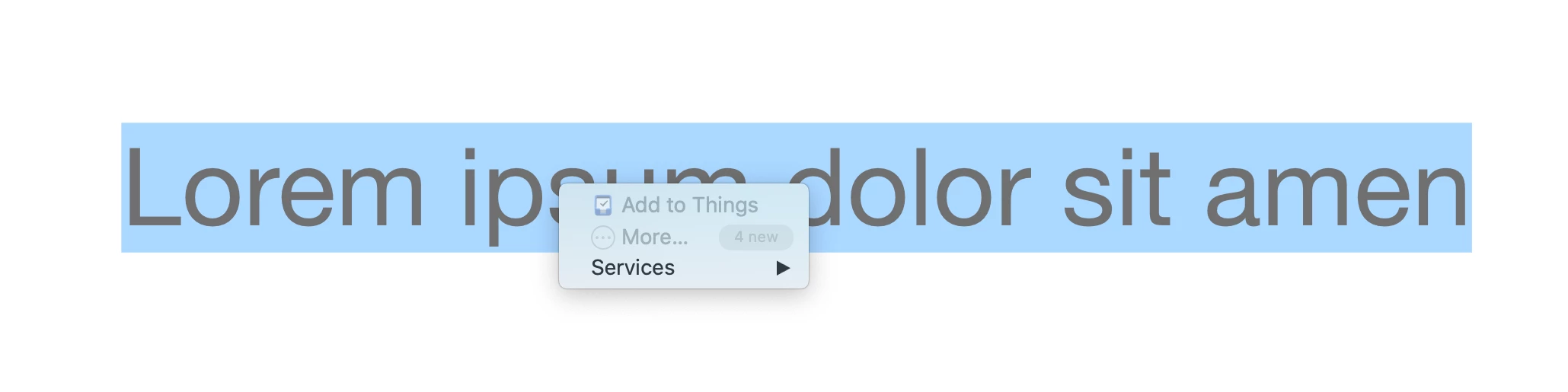


This is very annoying. Any ideas on how to disable it completely?

This topic has been closed for replies.

2 replies

Rishabh_Tiwari
Community Manager
Community Manager
May 23, 2020

Hi there,


Thanks for reaching out. Please try the suggestions shared by Ellimondo and let us know if that helps or if you need any further assistance.


Regards

Rishabh

Participating Frequently
May 22, 2020

This is a MacOS system-wide function that is especially annoying in XD. I've finally worked out how to turn it off. Go to Sys Prefs and Extensions. In the ALL list uncheck any apps with Actions checked. Once empty the menu will disappear.

Participant
February 12, 2023

Thanks very much. This was driving me nuts when using XD.
I was aware it was an Apple "feature", so I posted on the Apple Community forums. After 10 days there was no response. So I continued searching online, and found this thread.
I can add a comment to your proposed solution ... If the user still wants to have specific actions available, and if they were not showing up in the Actions popup in XD, then it's not necessary to disable them. It's only necessary to disable those that were showing in the Quick actions popup menu. In my case, it was a quick action for the 2Do app. "Add to 2Do". Very similar to the "Add to Things" shown in the OP's screenshot.


Again ... thanks for revealing the solution. It was making XD almost barely usable when it came to working with text.