mwdrop
Participant
January 5, 2019
Question

Set Grid Preferences to Bootstrap

  • January 5, 2019
  • 2 replies
  • 1211 views

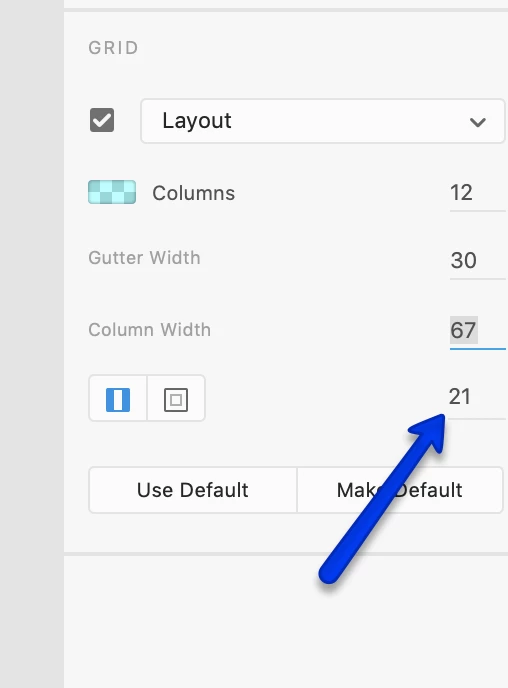
I'm struggling to set XD built-in grid preferences to match Boostrap 1170 grid.

I'm also not sure how the '21' associated with icons relates to the settings.
This topic has been closed for replies.

2 replies

matthallett
Participant
January 30, 2019

If you use 1366 as your artboard size and set the 3 grid values to 30, 68, 110, then it should match up with Bootstrap.

The grid tool needs improving though, it's really unintuitive and not very flexible. I think what's needed is a 'content width' setting so that you can restrict the total width of the grid. Some pre-sets would also be good - for example Bootstrap and other similar products.

Atul_Saini
Legend
January 8, 2019

Hi Mwdrop,

Thanks for sharing the screenshot, I would like to inform you that this number "21" is linked to margins of the grid. Please take a look at this link to match Bootstrap 1170 grid: - https://www.xdguru.com/bootstrap-grid-adobe-xd/ and for others check this as well: - Behance.

Please update this discussion in case you need further assistance.

Thanks,

Aul_Saini
