Participant
May 31, 2021
Answered

Share artboard in a prototype

  • May 31, 2021
  • 2 replies
  • 577 views

Hi,

We have an XD file of 53 artboards and links that connect them in order to demo it. Now, I want to share only one artoboard to get the specs for the development without the devs having to search in all the artboards.

Is it possible to create a direct link to an artboard which is in a prototype (flow)?

Thanks!

This topic has been closed for replies.
Correct answer Spas K.

Each page you open up in the web prototype has a unique link in the address bar, so you can copy that and give to a dev, without making them search for it in grid view.


If you want to generate a new unique link for only that artboard in Xd, you have to first duplicate it and remove all its links to other artboards. Then you have to select the artboard and click on the little share icon that pops above its name while in the Design tab:
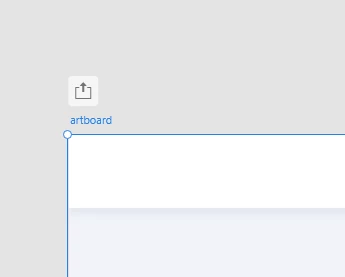


This creates a separate flow, containing only this artboard, which you can generate links for.

The reason I'm telling you to duplicate it and strip the links is because if you don't, and it's linked to other artboards, they will be included in that second flow, and their links will all be messed up, which you don't want.


2 replies

Spas K.
Community Expert
Spas K.Community ExpertCorrect answer
Community Expert
May 31, 2021

Each page you open up in the web prototype has a unique link in the address bar, so you can copy that and give to a dev, without making them search for it in grid view.


If you want to generate a new unique link for only that artboard in Xd, you have to first duplicate it and remove all its links to other artboards. Then you have to select the artboard and click on the little share icon that pops above its name while in the Design tab:


This creates a separate flow, containing only this artboard, which you can generate links for.

The reason I'm telling you to duplicate it and strip the links is because if you don't, and it's linked to other artboards, they will be included in that second flow, and their links will all be messed up, which you don't want.

Participant
May 31, 2021

Hi,

Thanks for your answer. It's a solution. I would prefer to have a link with only the artboard, but I don't want to duplicate everything or loose all the flow. So, I will go with the URL way.

Thanks very much!

Rishabh_Tiwari
Legend
May 31, 2021

Hi there,


Thanks for reaching out. You can create multiple flows while sharing in XD, to try that, please try the suggestions shared here: https://www.adobe.com/products/xd/learn/collaborate/stakeholder-review/creating-sharing-multiple-flows.html


Let us know if this helps or if you need any further assistance.


Regards

Rishabh
