Share Properties Panel is not showing correctly in Adobe XD.
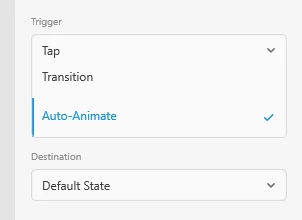
When I use the right properties inspector in prototype mode and open the different sections they float into each other making it hard to see what I'm doing or where I'm at. Here's an example from when I open the Action menu. It merges into the Trigger menu and the first event in the Trigger menu merges with the event options in the Action menu. The latter doesn't have any visible section name anymore cause its hidden. This same stuff happens in all the menues. So when I open then Destination menu it merges in the exact same manner with the Action menu above etc. Also that blue left bar on each option is annoying cause it really looks a scrollbar appearing due to content overflow, but its not. You should just make a clear selection background color on the selected option instead. All these things makes navigating in XD a somewhat messy experience. I'm on Windows 10. All up to date on both XD and Windows. You should really look into this.
<The Title was renamed by moderator>
 AdChoices