

danieldesigns
Participant
November 26, 2019
Answered

[Share]-Unable to Update Link in XD (option greyed out).

  • November 26, 2019
  • 1 reply
  • 3305 views

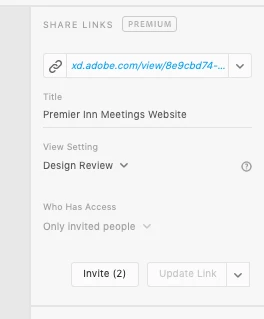
I need to update a share link for my clients to see the new changes made.


I have 2 clients already invited in from the previous link so do not want to have to create a new link everytime a change is made.


Any ideas why the Update Link button is greyed out?


<The Title was renamed by moderator>

This topic has been closed for replies.
Correct answer danieldesigns

Thanks for the reply.


It wasn't working still today after updating the the latest XD version, however weirdly the Update Link button did light up again after I made a new artboard and creating some prototypes page links... strange one but glad its now sorted.


Maybe a bug for investigation.


Cheers,

Dan

1 reply

Preran
Community Manager
Community Manager
November 26, 2019

That isn't usual. I suggest getting in touch with the tech support team https://adobe.ly/2WYE62m to see what could be going wrong. Use the chat button on the page to get started.


If you are OK with troubleshooting here, can you provide us with info on any change that could have resulted in this issue? Also, would it be possible to upload your file to a shared location and share the URL over a private message for ust to investigate?


Thanks,

Preran

danieldesigns
danieldesignsAuthorCorrect answer
Participant
November 27, 2019

Thanks for the reply.


It wasn't working still today after updating the the latest XD version, however weirdly the Update Link button did light up again after I made a new artboard and creating some prototypes page links... strange one but glad its now sorted.


Maybe a bug for investigation.


Cheers,

Dan

Preran
Community Manager
Community Manager
November 28, 2019

Thank you for providing us with an update. We will keep the team informed just in case this is something they have heard from other users as well.


Thanks,

Preran