
wapope
Inspiring
July 31, 2020
Question

Shared Link Not Showing Some Backgrounds

  • July 31, 2020
  • 1 reply
  • 707 views

Some of my share links are not rendering background colors properly. It looks fine in Preview, but once I share the links with my team and with clients, it looks like the photo below.
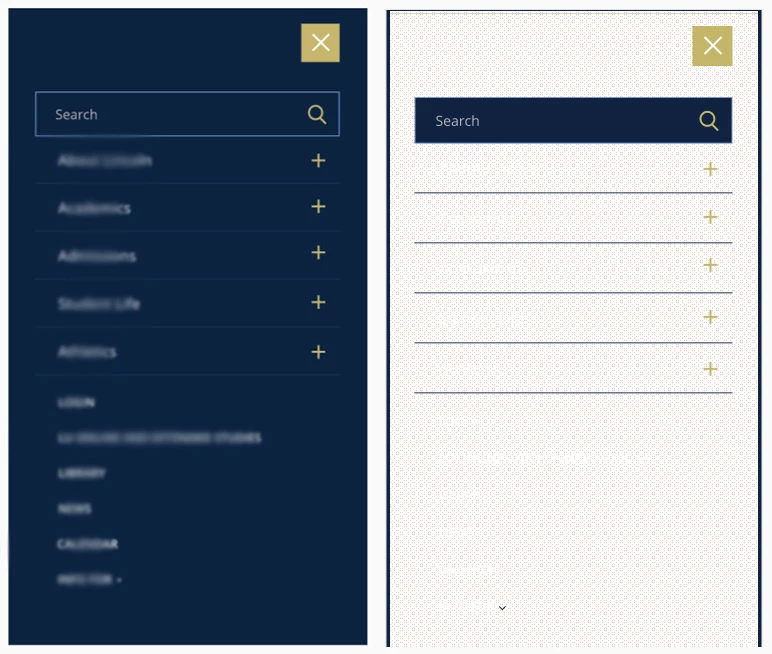

Left is Preview, Right is in Browser. Text has been blurred for client privacy.
I have seen this issue posted a few times, but haven't seen it resolved.
I'm using v 31.1.12, but have had the issue in several previous versions. OS is Windows 10x64
Have tried in Chrome, Firefox and Edge. It renders fine in Edge, but not in Firefox and Chrome. I have also played with the zoom settings and fullscreen and it doesn't seem to have an effect. I really need this to work in all browsers because we share these with a large number of clients.

Thank you!

    This topic has been closed for replies.

    1 reply

    Rishabh_Tiwari
    Legend
    July 31, 2020

    Hi William,


    Sorry to hear about the trouble. We will need to test this on our end so, will it be possible for you to share the link with us? If yes, you can share the link through DM, by clicking on my name and then send a message. 


    Note: Please add this discussion link in the subject while sending a DM.


    Regards

    Rishabh

    wapope
    wapopeAuthor
    Inspiring
    July 31, 2020

    Thank you, just sent a pm.

    wapope
    wapopeAuthor
    Inspiring
    August 3, 2020

    Hey Rishabh,

    I sent a PM last week, still haven't heard any follow-up from that. Was this ever looked into?

    Thanks!