


Participant
February 8, 2019
Answered

Sharing Options Limited - (still in Beta)

  • February 8, 2019
  • 2 replies
  • 532 views

Hello Internet and team,

I have Adobe XD (v15.0.12.8), and running on windows 10.

I am ready to publish a website public link for review or share design specs. I worked on a website last year so i know the ability exists, I know you had the ability to password protect it, make public and also very much so the ability to publish to the public and now need a password or adobe id to comment/review.

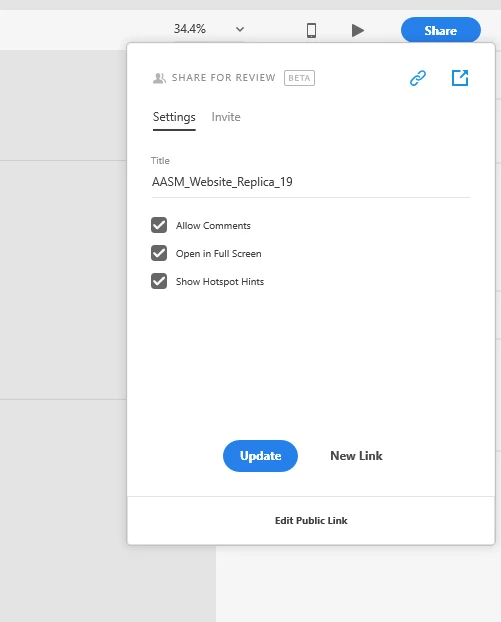
I don't have that this time around - not sure exactly why. Below is the screenshot of my options, creating a new link only takes me to the invite screen after, which wants me to insert email addresses to invite people.

Again I want to share my artboards for review. I don't want to save to the cloud or share the actual design file, just get feedback.

This topic has been closed for replies.
Correct answer Atul_Saini

Hi Oscars,

Thanks for using Adobe XD, I would like to inform you that we still have an option to password protect the documents when you share for review. However, it is only available with the public link. After looking at the screenshot, it looks like you are creating a "Private Link", please click on "Edit Public Link" and you should have that option.

Please update this discussion in case you need further assistance.

Thanks,

Atul_Saini

2 replies

Participant
April 2, 2023

Microsoft has a feature in itsbut it is undeniable that some find Google’s Nearby Share more intuitive. And given that it is being used on nearly 3 billion active Android devices, Microsoft knows there is a need to embrace it. As such, the app is now available as a beta on Windows in select regions.

Atul_Saini
Community Manager
Atul_SainiCommunity ManagerCorrect answer
Community Manager
February 8, 2019

Hi Oscars,

Thanks for using Adobe XD, I would like to inform you that we still have an option to password protect the documents when you share for review. However, it is only available with the public link. After looking at the screenshot, it looks like you are creating a "Private Link", please click on "Edit Public Link" and you should have that option.

Please update this discussion in case you need further assistance.

Thanks,

Atul_Saini

Participant
February 13, 2019

Thank you Atul,

I did not realize the text "Edit Public Link" was an actual button. It seems more of a descriptor, not a clickable thing.

Thank you for your help again!!!

Best Regards,

Oscar Salgado