rgtstyhyuyyyyyyyyyyyy
Participant
October 30, 2021
Answered

Size of the instance is changing in opposite direction that of a master component in XD

  • October 30, 2021
  • 2 replies
  • 714 views

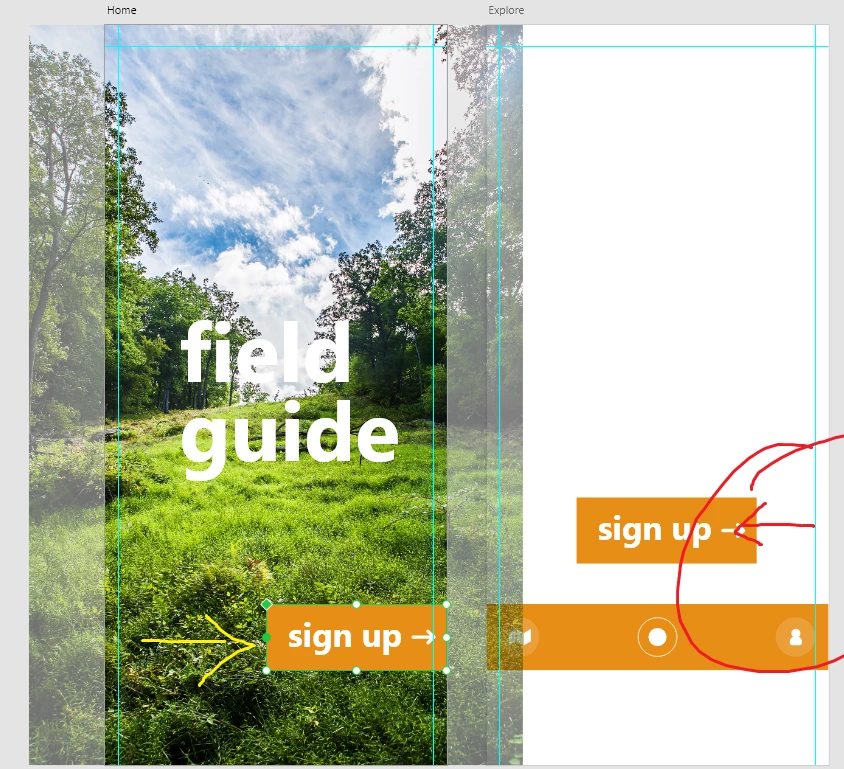
Probably a dead simple issue here, but I'm working through one of those Classroom in a Book manuals. I've created a Master Object then created an Instance of it on another artboard.


The problem is, when I change the size of the master it does the opposite change on the instance - see below.


Probably super obvious help but it's driving me mad!



<Title renamed by moderator>

This topic has been closed for replies.
Correct answer HARSHIKA_VERMA

Thanks for the details, @Spas K. and sharing the video. I confirmed with the team about this functionality and they mentioned that this is working as expected. 


When resizing a main component, we deliberately maintain the origin point (x, y) of any instances of the component so that they retain their position in an artboard.


Hope it helps.


Thanks,

Harshika

2 replies

Spas K.
Community Expert
Community Expert
November 2, 2021

Seems like when you resize the main component, Xd always resizes instances from the right and bottom. Not sure if this always worked that way or not. You would usually resize the instances, so can't recall if I've tried to do that too often.


@HARSHIKA_VERMA The expectation is that the instances will resize from the side you are resizing the main component, i.e. shrinking from the left or top when you grab the main component's left or top handle. Instead, they always resize from the right or the bottom. I've attached a video of it.


HARSHIKA_VERMA
Community Manager
HARSHIKA_VERMACommunity ManagerCorrect answer
Community Manager
November 8, 2021

Thanks for the details, @Spas K. and sharing the video. I confirmed with the team about this functionality and they mentioned that this is working as expected. 


When resizing a main component, we deliberately maintain the origin point (x, y) of any instances of the component so that they retain their position in an artboard.


Hope it helps.


Thanks,

Harshika

HARSHIKA_VERMA
Community Manager
Community Manager
November 1, 2021

Hi rgtstyhyuyyyyyyyyyyyy,


Thank you for reaching out. I am not able to reproduce the issue at my end on my windows machine on XD 45 version. Could you please share the version of XD and the operating system you're working on?


We'll try our best to help.


Thanks,

Harshika